
Tools
Error code: SystemForCrossDomainldentityManagementCredentialValidationUnavailable received for Azure provisioning integration - Service Desk
This article will discuss the origin of and how to resolve the error code "SystemForCrossDomainldentityManagementCredentialValidationUnavailable" upon testing the connection for Azure provisioning.
First published date
7/6/2023 8:22 PM
Last published date
2/20/2025 10:04 PM
Overview
When setting up Azure Provisioning, an administrator gets an error when testing the connection after adding the tenant URL and API Token.
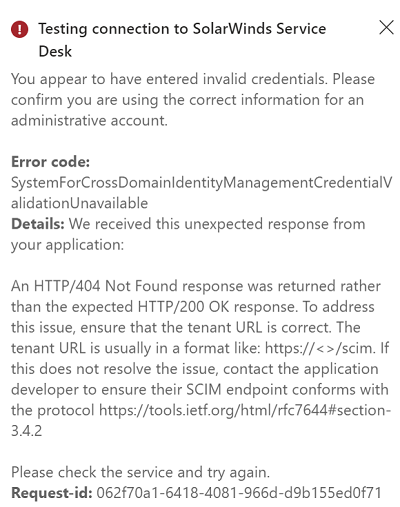
The administrator is expected to get this error if they choose "Create your own application" instead of adding the SolarWinds Service Desk app from the Azure AD App Gallery.
To resolve the issue, from the 'Browse Azure AD Gallery' section, look up the SolarWinds Service Desk app using the Search function.
Related articles:
- https://documentation.solarwinds.com/en/success_center/swsd/content/completeguidetoswsd/user-provisioning-with-azure.htm
- https://learn.microsoft.com/en-us/azure/active-directory/saas-apps/samanage-provisioning-tutorial
- https://documentation.solarwinds.com/en/success_center/swsd/content/completeguidetoswsd/token-authentication-for-api-integration.htm
The administrator is expected to get this error if they choose "Create your own application" instead of adding the SolarWinds Service Desk app from the Azure AD App Gallery.
To resolve the issue, from the 'Browse Azure AD Gallery' section, look up the SolarWinds Service Desk app using the Search function.
Related articles:
- https://documentation.solarwinds.com/en/success_center/swsd/content/completeguidetoswsd/user-provisioning-with-azure.htm
- https://learn.microsoft.com/en-us/azure/active-directory/saas-apps/samanage-provisioning-tutorial
- https://documentation.solarwinds.com/en/success_center/swsd/content/completeguidetoswsd/token-authentication-for-api-integration.htm
Product section
Service Desk
Cause
The administrator chose "Create your own application" instead of adding the SolarWinds Service Desk app from the Azure AD App Gallery.
Resolution
- If already created, delete the app that was created manually.
- Go to Azure Active Directory > Enterprise applications. Click +New application.
- Search for the "SolarWinds Service Desk" app, then click on it, and click Create to add the app.
- Once added, go to Provisioning. Set the Provisioning Mode to Automatic. Under Admin Credentials, enter the Tenant URL and the API Token.
- Click the Save button if the test is successful.
Refer to this article to proceed with the provisioning setup.