
Network Management
Getting Server Error in the Orion Web Console widget
This article addresses the issue where Web Console widget/s showing a Server error: There was an error processing the request.
First published date
12/4/2019 9:01 PM
Last published date
1/4/2022 12:32 AM
Overview
In the Orion Web Console, widget/s may show a Server error: There was an error processing the request as shown below:
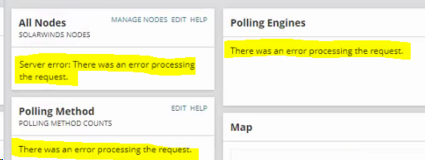
The following error might be seen in OrionWeb.log:
The following error might be seen in OrionWeb.log:
ERROR NodeTree - (null) Exception in GetTreeSection(1755, NT_r1755, [], 0) from user DOMAIN\USER. System.Web.HttpException (0x80004005): The file '/Orion/SwisfErrorControl.ascx' does not exist.
Product section
Orion Platform
Cause
- Missing ascx file
- Corrupt SAM module installation
Resolution
To resolve this issue
- Make sure there is unrestricted access to inetpub folder. If you are using antivirus software please check the logs if the processes accessing this folder are interrupted. The default location of the inetpub folder is C:\inetpub.
- Run the Orion Configuration Wizard (Website) to replace/rebuilt the missing SwisfErrorControl.ascx file.
- If the error message appears in SAM (Server & Application Monitor) resources related to component monitors - SAM needs to be repaired on the polling engine assigned to the node showing resource errors.
- If an issue still occurring there is a need to repair Information Service by following the steps from Repair a failing Job Engine, Collector, and Information Service in the Orion Platform article.