
Tools
Serv-U directory and file permission values
This article describes how to decode the Serv-U directory and file permission values when the users are exported through CSV
First published date
10/25/2020 10:11 AM
Last published date
10/25/2020 10:11 AM
Overview
Serv-U administrators can export the Domain users and Database users information through CSV.
This export file will show all the user account information including the LoginID, Encrypted Password, Home Directory and the permissions used in the said home directory folder.
The directory access values will be in Decimal format and needs to be converted to Hexadecimal before we can decode the corresponding folder and file permissions.
Serv-U allows these permissions for folder and files.
Files: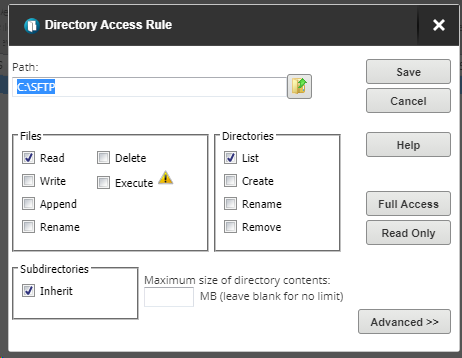
This export file will show all the user account information including the LoginID, Encrypted Password, Home Directory and the permissions used in the said home directory folder.
The directory access values will be in Decimal format and needs to be converted to Hexadecimal before we can decode the corresponding folder and file permissions.
Serv-U allows these permissions for folder and files.
Files:
- Read
- Write
- Append
- Rename
- Delete
- Execute
- List
- Create
- Rename
- Remove
- Inherit
Product section
Serv-U Managed File Transfer & Serv-U FTP Server
Resolution
After exporting the user accounts through CSV, look at the LoginID and the DirAccess columns and look at the numbers after 'Access'. These numbers are in Decimal format.
Convert this value from Decimal to Hexadecimal using any tool or online sites you wish to use.
See the sample values below.
Decimal Value: 6913
Converted Hexadecimal Value: 1B01
Take note of the Hex value and see the chart below for the corresponding permission values.
| First Digit | Second Digit (Directories) | Third Digit (Files) | Fourth Digit (Files) | ||||
| 0 | No Inherit | 0 | None | 0 | None | 0 | None |
| 1 | Inherit | 1 | Dir List | 1 | Rename | 1 | Read |
| 2 | Dir Create | 2 | Execute | 2 | Write | ||
| 3 | Dir List + Dir Create | 3 | Rename + Execute | 3 | Read + Write | ||
| 4 | Dir Remove | 4 | Append | ||||
| 5 | Dir List + Dir Remove | 5 | Read + Append | ||||
| 6 | Dir Create + Dir Remove | 6 | Write + Append | ||||
| 7 | Dir List + Dir Create + Dir Remove | 7 | Read + Write + Append | ||||
| 8 | Dir Rename | 8 | Delete | ||||
| 9 | Dir List + Dir Rename | 9 | Read + Delete | ||||
| A | Dir Create + Dir Rename | A | Write + Delete | ||||
| B | Dir List + Dir Create + Dir Rename | B | Read + Write + Delete | ||||
| C | Dir Remove + Dir Rename | C | Append + Delete | ||||
| D | Dir List + Dir Remove + Dir Rename | D | Read + Append + Delete | ||||
| E | Dir Create + Dir Remove + Dir Rename | E | Write + Append + Delete | ||||
| F | Dir List + Dir Create + Dir Remove + Dir Rename | F | Read + Write + Append + Delete | ||||
Using the sample above, the permission assigned for Hex 1B01 are as follows:
- Inherit
- Dir List + Dir Create + Dir Rename
- Read