Tools
Serv-U Administrator cannot edit domain users in Serv-U. Getting ERROR: The file or directory you're trying to access is not available to you.
This article shows how to troubleshoot a problem where the Serv-U Administrator in cannot make and save changes to a domain user account
First published date
10/1/2019 3:17 PM
Last published date
10/1/2019 3:17 PM
Overview
Serv-U Administrators can have remote access to settings in Serv-U, including the management of domain user accounts. This includes System Administrator, Domain Administrator and Group Administrators.
When a Serv-U Administrator edits a domain user account, they might encounter an error saying: ERROR: The file or directory you're trying to access is not available to you.
When a Serv-U Administrator edits a domain user account, they might encounter an error saying: ERROR: The file or directory you're trying to access is not available to you.
Product section
Serv-U Managed File Transfer & Serv-U FTP Server
Cause
The Serv-U Administrator does not have access to the Home Directory, Virtual Path, or Log path of the user account he/she is editing.
Scenario: The home directory of the System Administrator is D:/FTP/Users/Admins but the home directory of the domain user is D:/FTP/Users/DomainUser. The administrator does not have access to the directory of the user account.
Scenario: The home directory of the System Administrator is D:/FTP/Users/Admins but the home directory of the domain user is D:/FTP/Users/DomainUser. The administrator does not have access to the directory of the user account.
Resolution
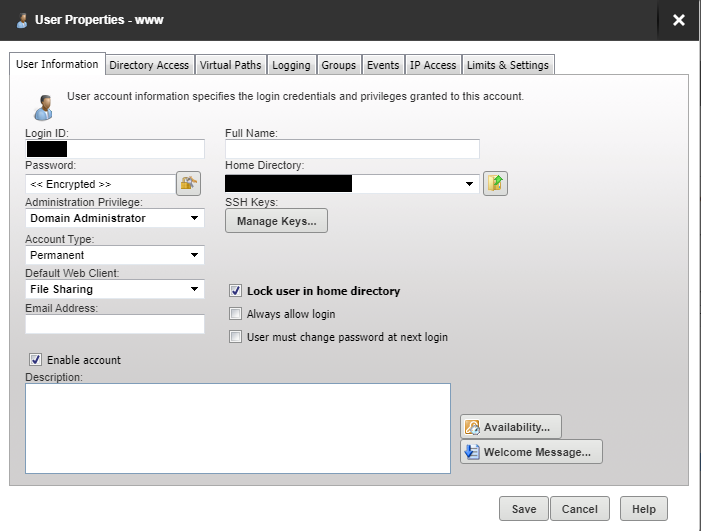
Go to the management console and edit the Administrator account. Deselect the option for 'Lock user in home directory' and then save.