
Tools
Serv-U port listeners does not work
This article shows how to troubleshoot a problem where the Serv-U port listeners does not work and does not accept connections.
First published date
5/12/2020 3:25 AM
Last published date
3/14/2025 9:26 PM
Overview
The Serv-U Domain Listeners need to be configured to accept connections for different protocols such as HTTP/S, FTP/S, or SFTP.
These are the list of supported protocols in the Serv-U application.
For FTP license:
Port 21 - Plain FTP and Explicit FTP (FTPS)
Port 990 - Implicit FTP (FTPS)
Port 80 - HTTP
For MFT license:
Port 21 - Plain FTP and Explicit FTP (FTPS)
Port 990 - Implicit FTP (FTPS)
Port 80 - HTTP
Port 443 - HTTPS
Port 22 - SFTP
There will be instances where one of these domain listener ports will have a yellow mark indicating that there are port conflicts that will cause the ports to not accept connections.
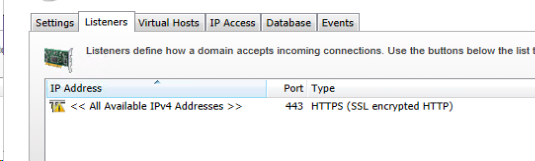
These are the list of supported protocols in the Serv-U application.
For FTP license:
Port 21 - Plain FTP and Explicit FTP (FTPS)
Port 990 - Implicit FTP (FTPS)
Port 80 - HTTP
For MFT license:
Port 21 - Plain FTP and Explicit FTP (FTPS)
Port 990 - Implicit FTP (FTPS)
Port 80 - HTTP
Port 443 - HTTPS
Port 22 - SFTP
There will be instances where one of these domain listener ports will have a yellow mark indicating that there are port conflicts that will cause the ports to not accept connections.
Product section
Serv-U Managed File Transfer & Serv-U FTP Server
Resolution
For port 80 and 443 conflict:
If Serv-U MFT and/or Gateway is installed on a Windows server:
For port 22 conflict:
If Serv-U MFT and/or Gateway is installed on a Linux server:
For other port conflicts:
To narrow down which applications are using the conflicted port in the server, you can try the following procedures.
If Serv-U MFT and/or Gateway is installed on a Windows server:
- Check if IIS is enabled.
- Check if the World Wide Web service is running in the Windows Services Manager.
- Confirm with the customer if they agree with stopping these services to allow Serv-U to use port 80 or 443.
- Check for other services that might be using the HTTPS ports (Windows only) Open a command prompt and run the command:
-- Scripts are not supported under any SolarWinds support program or service.
-- Scripts are provided AS IS without warranty of any kind. SolarWinds further
-- disclaims all warranties including, without limitation, any implied warranties
-- of merchantability or of fitness for a particular purpose. The risk arising
-- out of the use or performance of the scripts and documentation stays with you.
-- In no event shall SolarWinds or anyone else involved in the creation,
-- production, or delivery of the scripts be liable for any damages whatsoever
-- (including, without limitation, damages for loss of business profits, business
-- interruption, loss of business information, or other pecuniary loss) arising
-- out of the use of or inability to use the scripts or documentation.

NET STOP HTTP
- This will show the list of Windows services that might be using the HTTP/S port
For port 22 conflict:
If Serv-U MFT and/or Gateway is installed on a Linux server:
- Port 22 is a native port used to access Remote Server via Terminal. This cannot be used as an SFTP listener.
- Use another port for the SFTP listener (such as 2222) and then set the external firewall to forward all port 22 connections to port 2222 in Serv-U.
For other port conflicts:
- Check to see if there are other FTP/SFTP applications installed in the machine.
- Check if there are other web server applications such as Tomcat installed on the same server.
To narrow down which applications are using the conflicted port in the server, you can try the following procedures.
- Disable the Serv-U port listener from the Domain Listeners tab
- Run a netstat command to see if the problem port is listening. Sample commands are:
-- Scripts are not supported under any SolarWinds support program or service.
-- Scripts are provided AS IS without warranty of any kind. SolarWinds further
-- disclaims all warranties including, without limitation, any implied warranties
-- of merchantability or of fitness for a particular purpose. The risk arising
-- out of the use or performance of the scripts and documentation stays with you.
-- In no event shall SolarWinds or anyone else involved in the creation,
-- production, or delivery of the scripts be liable for any damages whatsoever
-- (including, without limitation, damages for loss of business profits, business
-- interruption, loss of business information, or other pecuniary loss) arising
-- out of the use of or inability to use the scripts or documentation.

netstat -ano | findstr :443 (for Windows)
netstat -ano | grep :22 (for Linux)
- Check the PID of the listening ports and compare it from Task Manager or Resource Monitor (for Windows)