
Database Management
Secure FTP Task – Get List of Files with Metadata
First published date
7/29/2021 9:54 PM
Last published date
7/29/2021 9:54 PM
Overview
This article will show how to use the ‘Get List of Files with Metadata’ action in the TF Secure FTP Task. The tutorial will cover how to write the metadata to a SQL table.
Product section
Task Factory (TF)
Resolution
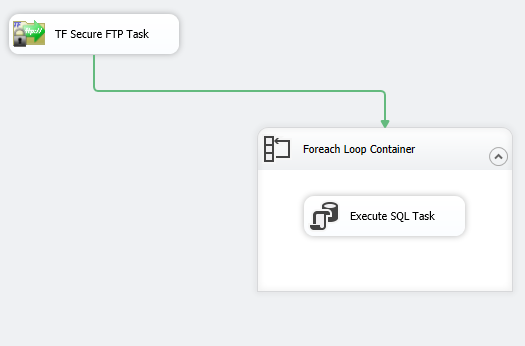
A simple package to accomplish this task will look as the following:
5. In ‘Directory location on server’, use the … button to browse the SFTP server for the directory containing the files you wish to gather metadata about.
6. In the File Filter, provide either a file name or a common naming convention using an * as a wildcard character
- Bring in a Secure FTP Task to the Control Flow, and open for Editing
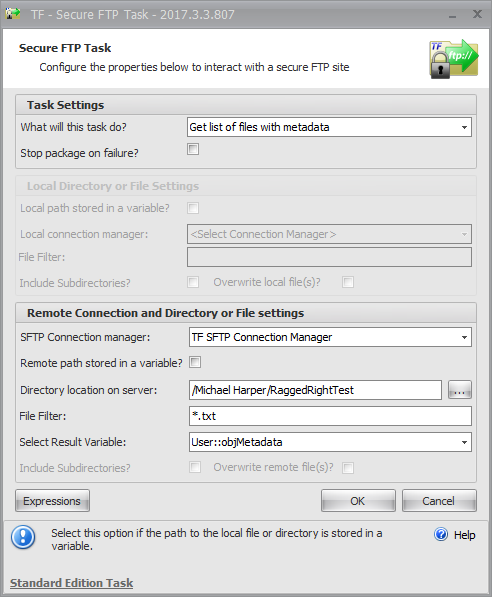
- Select ‘Get List of Files with Metadata’ for the action
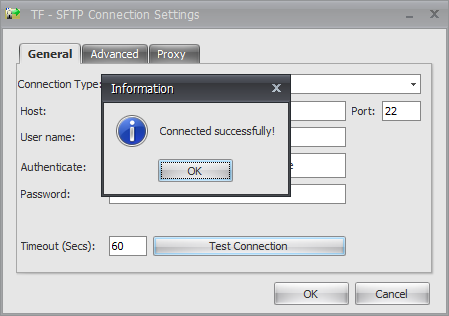
- Under ‘SFTP Connection manager’, choose ‘Create New SFTP connection’
- Configure connection manager to test successfully to your SFTP site
5. In ‘Directory location on server’, use the … button to browse the SFTP server for the directory containing the files you wish to gather metadata about.
6. In the File Filter, provide either a file name or a common naming convention using an * as a wildcard character
a. In my example, I am gathering information on texts files and use *.txt as my File Filter
b. 
7. In ‘Select Results Variable’, either choose an existing object variable or create a new object variable
8. The Secure FTP Task configuration should look like this:
9. Bring in a Foreach Loop Container and open for editing
10. On the Collection tab, choose Foreach ADO Enumerator as the enumerator and the object variable selected in the Secure FTP Task as the ADO object source variable. Enumeration mode should be set to Rows in the first table
11. On the Variable Mappings tab, you will need to map 3 SSIS variables. These can either be created prior to setting up the Foreach Loop, or created on the Variable Mappings. The variables should be
File Name – string variable
Modified Date – string variable
File Size – string variable
12. Select ‘OK’ to close the Foreach Loop Editor
13. Place an ‘Execute SQL Task’ inside the Foreach Loop Container and open the Execute SQL Task for editing
14. Under the SQL Statement section, the following settings will be necessary
ConnectionType – OLE DB
Connection – select an OLE DB connection manager for your SQL Server instance
SQLStatement – This will be an INSERT INTO statement to a pre-existing SQL Table
i. SQL Table Design:
ii..T-SQL: INSERT INTO dbo.SFTP_Metadata (FileName, CreatedDate, FileSize) Values (?,?,?)
iii.. The question marks in the T-SQL statement represent a parameter which will need to be mapped. These parameters will be the variable mapped in the Foreach Loop container.
15. On the Parameter Mapping tab, the variables should be mapped as follows. Note the Data Type, Parameter Name, and Parameter Size fields
16. Once these steps have been completed, you should be able to run the package and the metadata you selected will be written to your SQL Table.
https://support.sentryone.com/s/article/Secure-FTP-Task-Get-List-of-Files-with-Metadata
7. In ‘Select Results Variable’, either choose an existing object variable or create a new object variable
8. The Secure FTP Task configuration should look like this:
9. Bring in a Foreach Loop Container and open for editing
10. On the Collection tab, choose Foreach ADO Enumerator as the enumerator and the object variable selected in the Secure FTP Task as the ADO object source variable. Enumeration mode should be set to Rows in the first table
11. On the Variable Mappings tab, you will need to map 3 SSIS variables. These can either be created prior to setting up the Foreach Loop, or created on the Variable Mappings. The variables should be
File Name – string variable
Modified Date – string variable
File Size – string variable
12. Select ‘OK’ to close the Foreach Loop Editor
13. Place an ‘Execute SQL Task’ inside the Foreach Loop Container and open the Execute SQL Task for editing
14. Under the SQL Statement section, the following settings will be necessary
ConnectionType – OLE DB
Connection – select an OLE DB connection manager for your SQL Server instance
SQLStatement – This will be an INSERT INTO statement to a pre-existing SQL Table
i. SQL Table Design:
ii..T-SQL: INSERT INTO dbo.SFTP_Metadata (FileName, CreatedDate, FileSize) Values (?,?,?)
iii.. The question marks in the T-SQL statement represent a parameter which will need to be mapped. These parameters will be the variable mapped in the Foreach Loop container.
15. On the Parameter Mapping tab, the variables should be mapped as follows. Note the Data Type, Parameter Name, and Parameter Size fields
16. Once these steps have been completed, you should be able to run the package and the metadata you selected will be written to your SQL Table.
https://support.sentryone.com/s/article/Secure-FTP-Task-Get-List-of-Files-with-Metadata