
Tools
SSL certificate settings on Serv-U FTP license
This article explains the SSL certificate settings on Serv-U FTP license compared to an MFT license.
First published date
5/28/2020 8:58 PM
Last published date
5/28/2020 8:58 PM
Overview
Serv-U has two types of licenses which are Serv-u FTP and Serv-U MFT. The difference is the pricing and the available features that Serv-U can do. To see the features list, refer to this article
Since the FTP license supports the FTPS protocol, Serv-U needs to use an SSL certificate (either a self-signed certificate or a 3rd party provider signed certificate).
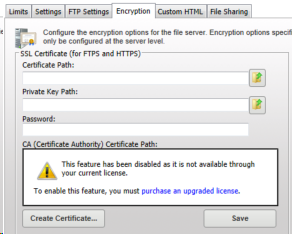
For Serv-U with FTP license, there will be a message that shows in the Encryption tab preventing administrators to add a Certificate Authority in Serv-U.
Serv-U FTP license Encryption page:
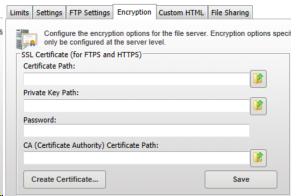
Serv-U MFT license Encryption page:
Since the FTP license supports the FTPS protocol, Serv-U needs to use an SSL certificate (either a self-signed certificate or a 3rd party provider signed certificate).
For Serv-U with FTP license, there will be a message that shows in the Encryption tab preventing administrators to add a Certificate Authority in Serv-U.
Serv-U FTP license Encryption page:
Serv-U MFT license Encryption page:
Product section
Serv-U Managed File Transfer & Serv-U FTP Server
Resolution
- Serv-U with FTP license will still accept a self-signed and a 3rd party SSL provider signed certificate and it will still show the certificate and the connection is still secure
- There should not be any difference with the FTPS connectivity and functionality with the FTP and MFT license
- The only difference is that using an FTP license, the Certificate Authority (root and intermediate certificate bundle) cannot be imported in Serv-U but FTPS should still work