
Database Management
SQLSentry Portal access blocked by "You do not have access to the specified SentryOne database"
Feature-based security blocks users from accessing Portal when they do not have login information saved under their contact in the Client.
First published date
5/6/2022 12:45 PM
Last published date
12/10/2025 4:16 PM
Overview
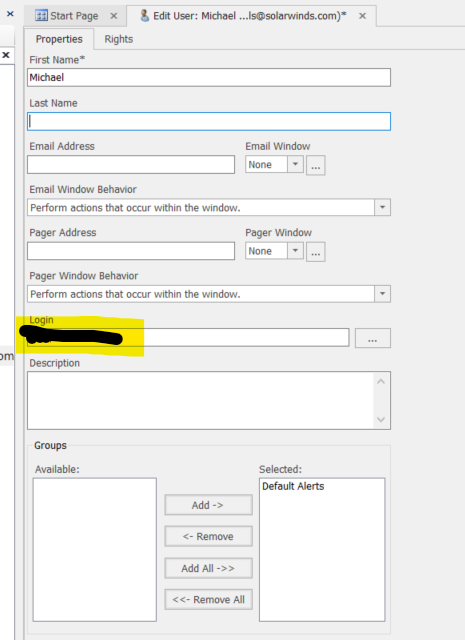
When upgrading to 2022.2.0 and newer, if the user does not have Information in the Login field on the Contacts page for the user they are attempting to access Portal with, they will run into a message stating:
You do not have access to the specified SentryOne database. Please contact your administrator for access.
Portal was upgraded to use React in SQL Sentry version 2025.4. With this, the messaging has changed for this scenario. In version 2025.4 and later, it will look like the message below.
Product section
SQL Sentry (SQLS)
Cause
Version 2022.2.0 introduced feature-based security, making the site inaccessible to users that do not have a login associated with their Contact.
Resolution
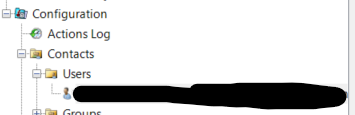
Go to the Contacts section within the SQL Sentry Navigator Pane and open the contact having issues accessing Portal. Add in the user's domain\username to the Login section of the Contact properties. Save the changes and refresh the Portal page.
Further information on Feature-Based Security can be found in the SQL Sentry help documentation.
https://docs.sentryone.com/help/sql-sentry-portal-security#feature-based-security
Further information on Feature-Based Security can be found in the SQL Sentry help documentation.
https://docs.sentryone.com/help/sql-sentry-portal-security#feature-based-security