Applications Systems
SQL credentials issue in SAM
This article provides brief information and steps to resolve the issue when you are using a SQL template assigned to a SQL server with correct credentials but receiving errors.
First published date
10/9/2018 6:19 PM
Last published date
4/24/2020 4:09 PM
Overview
SQL User experience monitors are being marked as up but you're still get authentication failures on the target SQL server.
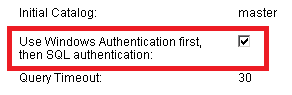
The SQL Server User Experience Monitor components by default attempt to login to the server using a SQL account first and then attempt a AD user. This shows you how to reverse the order so that you no longer get Audit Failures.
Product section
Server Application Monitor
Cause
The first attempt at verifying the credentials uses SQL authentication, which fails with Windows credentials. The second attempt uses Windows authentication and will succeed.
Resolution
Modify the template and/or application by checking the option named "Use Windows Authentication first, then SQL authentication" for all components.