
Database Management
SQL Sentry Setting up Monitoring Across Non-Trust Domains
This article will guide on how to set up monitoring across non-trust domain.
First published date
7/20/2021 1:30 PM
Last published date
10/4/2023 8:10 PM
Overview
Many SQL Sentry users were unable to access individual targets across domains with limited or no trust. By installing the Client and Services, using SQL server name as name of the instance hosting the SQL Sentry repository and database name as the name of SQL Sentry Repository. In Service Account information, you should enter an account that has Local Admin permissions on each target within domain. Once done with the installation, Client and Services, you can now open the client on the server separate from the domain hosting the SQL Sentry repository.
Two very popular options:
Two very popular options:
- Install a separate Monitoring Service within each Domain of the Monitoring Environment.
- Pass-through Authentication through SQL Sentry Monitoring Environment
Product section
SQL Sentry (SQLS)
Cause
Many SQL Sentry users come across is not being able to access individual targets across domains with limited or no trust.
Resolution
Setting up Monitoring Across Non-Trust Domains
One problem that many SQL Sentry users come across is not being able to access individual targets across domains with limited or no trust. SQL Sentry offers a powerful technique to allow you to quickly and easily gather your data and send it back to the SQL Sentry repository to display in your SQL Sentry client.
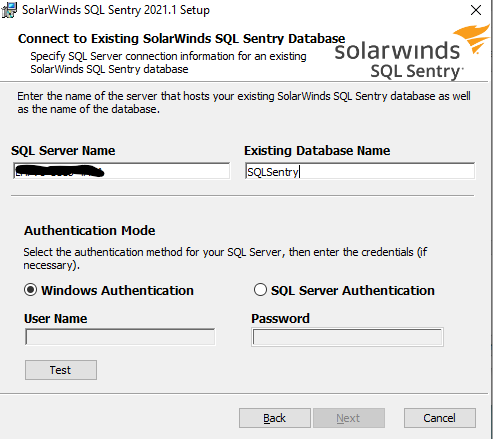
Once added the targets will populate in the Client in the same domain as the SQL Sentry repository Enter name of the instance hosting the SQL Sentry repository, and the name of the SQL Sentry Repository
One problem that many SQL Sentry users come across is not being able to access individual targets across domains with limited or no trust. SQL Sentry offers a powerful technique to allow you to quickly and easily gather your data and send it back to the SQL Sentry repository to display in your SQL Sentry client.
- This article makes the following assumptions.
- That you have already installed the full suit of the SQL Sentry products to include the client, services, and repository on at least one of the domains in question.
- You can access the non-trusted domain within the network hosting the SQL Sentry repository.
- All necessary ports for SQL Server are open between the two domains
- Launch the SQL Sentry installation executable package on the domain separate from the repository.
- You can find the SQL Sentry installation at https://customerportal.solarwinds.com/
- Please note that the new installer must be the same version as the client and repository already installed.
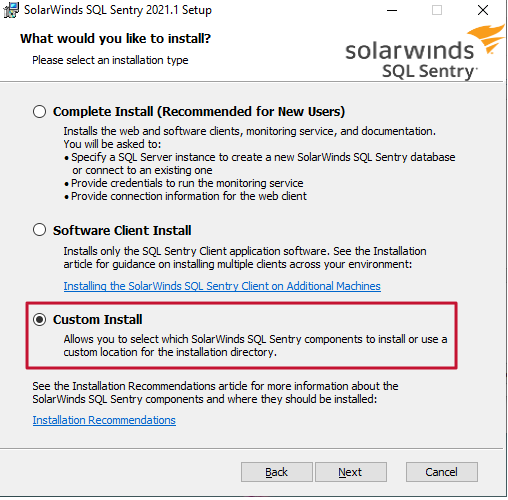
- Select to only install the Client and Services
- Note: Installing the Client on the domain separate from the SQL Sentry repository allows you to more easily add the targets within that domain. If you prefer this option, then you would select the highlighted option in the screenshot below:
Once added the targets will populate in the Client in the same domain as the SQL Sentry repository Enter name of the instance hosting the SQL Sentry repository, and the name of the SQL Sentry Repository
- Follow the SolarWinds Help Documentation for additional reference to the installation/implementation across Domains. SQL Sentry Installation and Upgrade Guide
- You should now be able to close this client and return to the client on the domain hosting the SQL SQL Sentry repository.
- You may need to close and re-open the client for changes to take affect
- Data should be flowing to the SQL Sentry repository from the non-trust domain targets
- You can check this by opening the targets in the site hosting the targets in the non-trusted domain and verifying there are no red banners
- If you have any questions during this process you can reach out to the SQL Sentry support team.