
Database Management
SQL Sentry Issues Collecting Metrics for Amazon RDS Target Related to Role-Based Permissions
This is a How-To article on adjusting permissions for an Amazon RDS instance. The purpose of this article is to include the correct role-based security roles for an Amazon RDS instance target. If hosting the repository on an AWS RDS you are not able to have SA privileges and role-based aka user mapping to the repository is required.
First published date
1/26/2022 8:47 PM
Last published date
8/21/2023 3:44 PM
Overview
The role-based security permissions for allow_all have denied permissions tagged to it.
Unselect "allow_all" if selected and every other role excluding "allow_least_privilege" and "allow_all". Once you have performed this, launch the client to ensure you are collecting metrics with success. You will also need db_owner to ensure permission is granted to the RSAKeyPair table.
These two Deny permissions are tagged to allow_all, which can cause confusion.
DENY UPDATE ON Contact(SID) TO allow_all
DENY SELECT, UPDATE ON RSAKeyPair(PrivateKeyEncrypted) TO [allow_all]
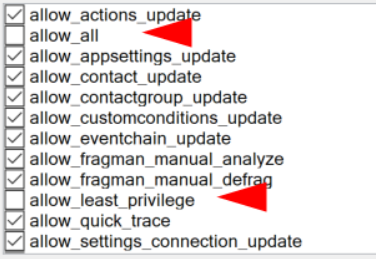
Unselect "allow_all" if selected and every other role excluding "allow_least_privilege" and "allow_all". Once you have performed this, launch the client to ensure you are collecting metrics with success. You will also need db_owner to ensure permission is granted to the RSAKeyPair table.
These two Deny permissions are tagged to allow_all, which can cause confusion.
DENY UPDATE ON Contact(SID) TO allow_all
DENY SELECT, UPDATE ON RSAKeyPair(PrivateKeyEncrypted) TO [allow_all]
Product section
SQL Sentry (SQLS)
Cause
N/A
Resolution
Adjust the role-based security permissions accordingly by excluding allow_all and allow_least_privilege and including all other allow roles. The permission db_owner is still a vital user mapping to include so you can prevent access-denied errors for the RSAKeyPair table and the Contact table. Any changes to permissions performed will need a restart of the monitoring services afterward for things to take effect.
For additional reference the SolarWinds help documentation gives more explanation:
SQL Sentry Role Based Security
For additional reference the SolarWinds help documentation gives more explanation:
SQL Sentry Role Based Security