
Network Management
SQL DB Server Windows could not start the SQL Server Error 17051
Windows could not start the SQL Server (XXXXXX) on Local Computer. For More information, review the System Event Log. If this is a non-Microsoft Service, contact the service vendor, and refer to service-specific error code 17051.
First published date
10/25/2018 9:17 AM
Last published date
4/29/2020 10:12 PM
Overview
Windows could not start the SQL Server (XXXXXX) on Local Computer. For More information, review the System Event Log. If this is a non-Microsoft Service, contact the service vendor, and refer to service-specific error code17051.
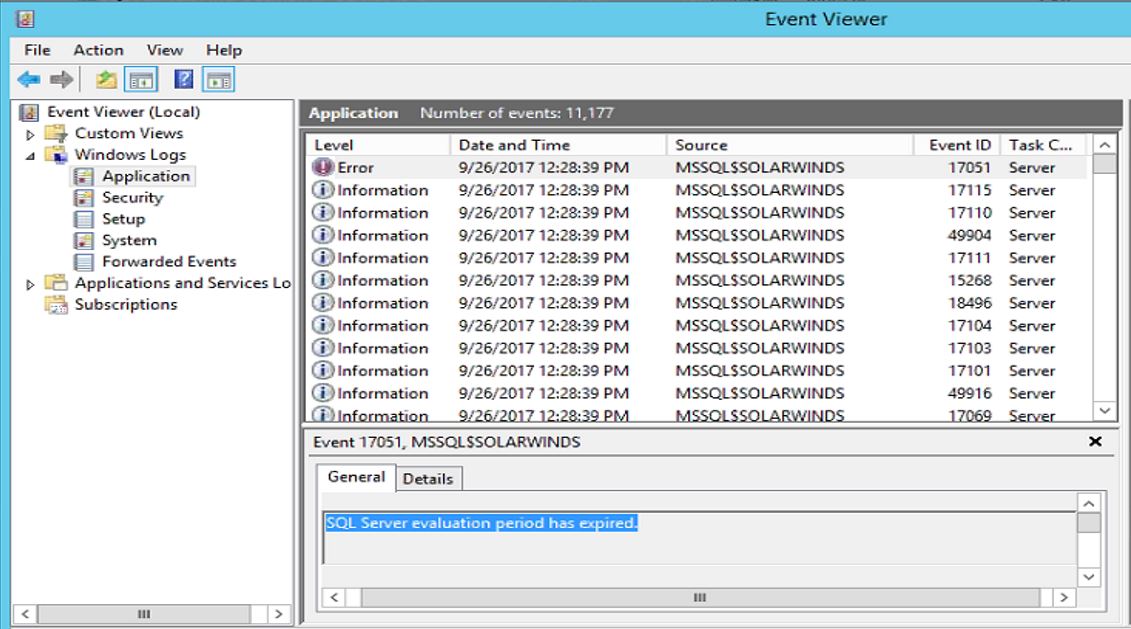
- Check the Event ID in the Event Viewer which shows SQL Server Evaluation Period has expired under Details section.
- The customer might have installed the Instance under Evaluation of 180 days because NO Product Key has been applied during the Installation.
Product section
Network Performance Monitor
Cause
Microsoft SQL Server Evaluation has expired
Resolution
Resolution:
- Apply Product Key or coordinate with the vendor.
Disclaimer: Please note, any content posted herein is provided as a suggestion or recommendation to you for your internal use. This is not part of the SolarWinds software or documentation that you purchased from SolarWinds, and the information set forth herein may come from third parties. Your organization should internally review and assess to what extent, if any, such custom scripts or recommendations will be incorporated into your environment. You elect to use third party content at your own risk, and you will be solely responsible for the incorporation of the same, if any.