
Applications Systems
SAM and VMAN 2019.4 feature: Monitor Hardware Health for Nutanix
Starting in SAM 2019.4 and VMAN 2019.4, you can monitor Hardware Health for Microsoft Hyper-V and VMware nodes in monitored Nutanix clusters.
First published date
10/9/2019 8:54 PM
Last published date
11/5/2019 9:38 PM
Overview
You can already monitor Hardware Health for Dell, HP, HPE ProLiant, IBM, Cisco UCS, and VMware server hardware components in SAM and VMAN. The 2019.4 releases of those products add the ability to monitor Hardware Health for virtual machines and hosts managed through Nutanix so you can:
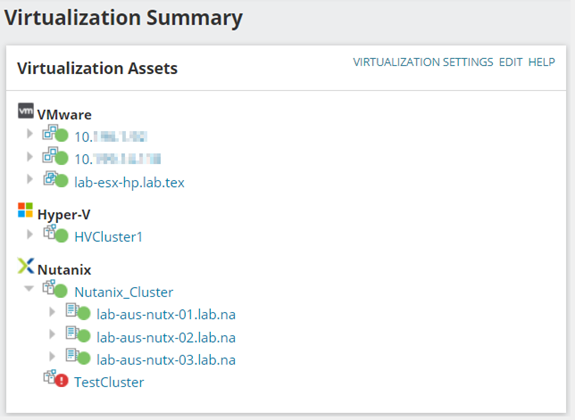
After waiting about ten minutes for polling to occur, you can display Hardware Health data for monitored Nutanix clusters on the Virtualization Summary page.
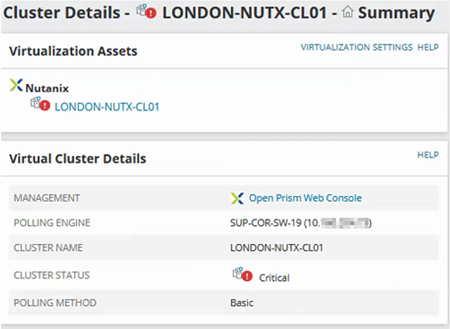
Drill down into child nodes to display more information. For example, you can display polling details and access the Prism Web Console in the Cluster Details widget, as shown here:
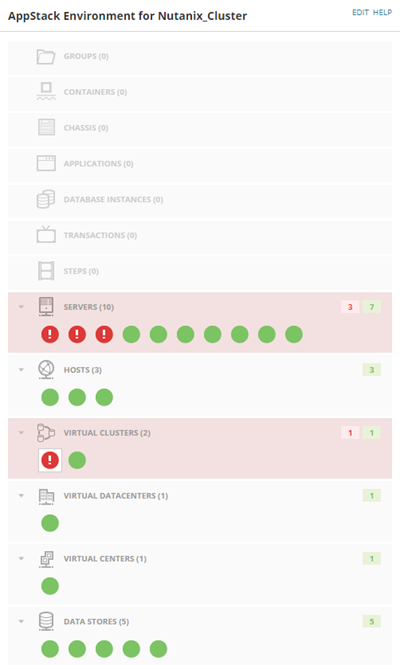
You can also gain insight into your Nutanix environment with a full AppStack for Nutanix clusters, hosts, and virtual machines. See the status of servers, virtual clusters, datastores, and more. When needed, use AppStack as a troubleshooting tool to drill down into your Nutanix infrastructure to investigate and track down issues.
Note: The default port for the Nutanix API is 9440; the SSH port is 22.
To learn more, see Monitor Hardware Health for Nutanix appliances in the Orion Platform Administrator Guide. For details about VMAN support for this feature, click here.
- Determine the Up/Down status of Nutanix clusters.
- Get Hardware Health data for Microsoft Hyper-V and VMware nodes in monitored Nutanix clusters.
- Set up alerts to notify you if hardware issues occur for hosts associated with Nutanix clusters.
After waiting about ten minutes for polling to occur, you can display Hardware Health data for monitored Nutanix clusters on the Virtualization Summary page.
Drill down into child nodes to display more information. For example, you can display polling details and access the Prism Web Console in the Cluster Details widget, as shown here:
You can also gain insight into your Nutanix environment with a full AppStack for Nutanix clusters, hosts, and virtual machines. See the status of servers, virtual clusters, datastores, and more. When needed, use AppStack as a troubleshooting tool to drill down into your Nutanix infrastructure to investigate and track down issues.
Note: The default port for the Nutanix API is 9440; the SSH port is 22.
To learn more, see Monitor Hardware Health for Nutanix appliances in the Orion Platform Administrator Guide. For details about VMAN support for this feature, click here.
Product section
Server Application Monitor