
Database Management
Unable to start the DPA Server. Reason: the Repository [NewDPARepoServer] was already started by another DPA at
When trying to access DPA web console you wee error: The DPA server process was recently restarted after a hard shutdown
First published date
4/10/2022 9:48 AM
Last published date
4/10/2022 9:48 AM
Overview
You are running DPA 2021.3.x version of DPA and migrated DPA repository from one MS SQL server to another running same SQL version as per Move DPA repository on SQL Server and completed post migration config part as per that KB.
When you access the DPA web console you get the following error:
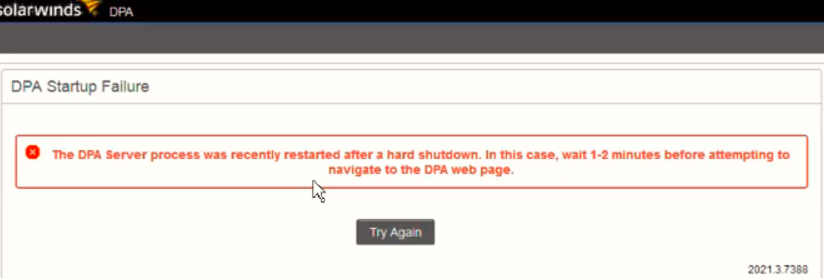
And in idc.log you see message similar to:
When you access the DPA web console you get the following error:
And in idc.log you see message similar to:
WARN (2022-04-10T16:02:08,085+0700) [repositoryManager-thread-1] RepositoryMonitor:1424 - Unable to start the DPA Server. Reason: the Repository [WIN-T76N38049VT] was already started by another DPA at [http://192.168.1.55:8123/iwc, https://192.168.1.55:8124/iwc]
Product section
Database Performance Analyzer
Cause
Time on New DPA repository (SQL/DB) server do not match time on DPA web server
Resolution
1. Make sure the Date and time on the new Repository SQL DB server is same as time and date on DPA App server.
2. Restart SQL Service
3. Restart DPA (ignite) Service
4. Try accessing DPA web console
Other possible causes for similar error are due to stale references, please refer to DPA will not restart after crash due to improperly closing connection to the repository
2. Restart SQL Service
3. Restart DPA (ignite) Service
4. Try accessing DPA web console
Other possible causes for similar error are due to stale references, please refer to DPA will not restart after crash due to improperly closing connection to the repository