
Applications Systems
Recorder Options Menu is Hidden or Blocked
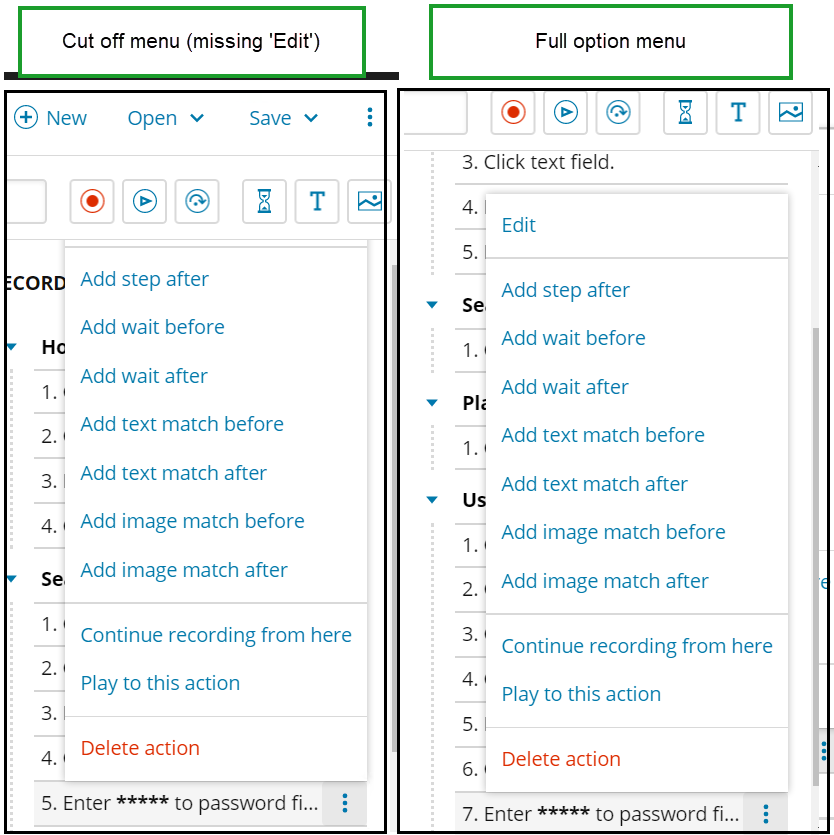
Cannot click on specific options menu items. The WPM Recorder is showing hidden options in the right pane. Cannot edit inputted text on an existing Recording.
First published date
7/29/2020 8:36 PM
Last published date
7/29/2020 8:43 PM
Overview
Within the WPM Recorder, when trying to modify text that is inserted in a website, the options menu is cut off and the user is unable to click on the option then need to. The user wants to click "Edit" so they can modify the username or password for a Recording without having to re-record the entire Recording.
Product section
Web Performance Monitor
Cause
Unknown
Resolution
This is a current bug in WPM. Please submit a support ticket if you experience this issue.
Potential workaround:
If either workaournd is not successful, the Recording must be rebuilt in order to edit text for the time being.
Potential workaround:
- Try to change the height of WPM Recorder window which may change the place of popup appearance and make Edit action accessible.
- Sometimes going in to "Play Action By Action Mode" changes layout and makes popup open to the bottom edge of the screen instead of the upper age.
If either workaournd is not successful, the Recording must be rebuilt in order to edit text for the time being.