
Network Management
RabbitMQ not running on the standby main poller in the HA pool due to inconsistent RabbitMQ cluster status
This article describes how to recreate the RabbitMQ cluster if it is in an inconsistent state. Alerts aren't triggering on Orion 2020.2 with High Availability. Alerts only trigger when you force a HA failover or restart services, or restart the server, or edit an alert and submit a change.
First published date
7/22/2020 11:10 AM
Last published date
11/5/2025 11:45 PM
Overview
This issue is seen when the RabbitMQ cluster is in an inconsistent state. The active main poller thinks the RabbitMQ is clustered with the standby main poller but the standby has its own cluster.
The deployment health page indicates a messagebus issue.
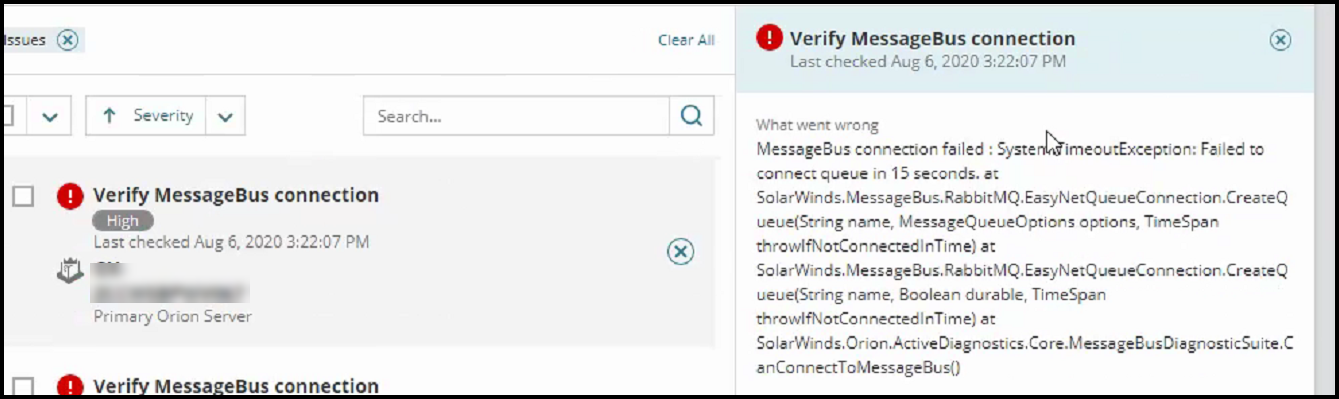
When the rabbitmqctl cluster_status command is run from CMD prompt on both servers the following is seen
Active Main Poller:
C:\Program Files (x86)\SolarWinds\Orion\RabbitMQ\sbin>rabbitmqctl cluster_status
Cluster status of node rabbit@<active_main_poller> ...
[{nodes,[{disc,['rabbit@<active_main_poller>','rabbit@<standby_main_poller>']}]},
{running_nodes,['rabbit@<active_main_poller>']},
{cluster_name,<<"rabbit@<active_main_poller>.<domain>">>},
{partitions,[]},
{alarms,[{'rabbit@<active_main_poller>',[]}]}]
Standby Main Poller:
C:\Program Files (x86)\SolarWinds\Orion\RabbitMQ\sbin>rabbitmqctl cluster_status
Cluster status of node rabbit@<standby_main_poller> ...
[{nodes,[{disc,['rabbit@<standby_main_poller>']}]},
{running_nodes,['rabbit@<standby_main_poller>']},
{cluster_name,<<"rabbit@<standby_main_poller>.<domain>">>},
{partitions,[]},
{alarms,[{'rabbit@<standby_main_poller>',[]}]}]
On the Standby Main poller the following error is also seen in the RabbitMQ logs:
[error] <0.1086.0> Node rabbit@<active main poller> thinks it's clustered with node rabbit@<standby main poller>, but rabbit@<standby main poller> disagrees
The deployment health page indicates a messagebus issue.
When the rabbitmqctl cluster_status command is run from CMD prompt on both servers the following is seen
Active Main Poller:
C:\Program Files (x86)\SolarWinds\Orion\RabbitMQ\sbin>rabbitmqctl cluster_status
Cluster status of node rabbit@<active_main_poller> ...
[{nodes,[{disc,['rabbit@<active_main_poller>','rabbit@<standby_main_poller>']}]},
{running_nodes,['rabbit@<active_main_poller>']},
{cluster_name,<<"rabbit@<active_main_poller>.<domain>">>},
{partitions,[]},
{alarms,[{'rabbit@<active_main_poller>',[]}]}]
Standby Main Poller:
C:\Program Files (x86)\SolarWinds\Orion\RabbitMQ\sbin>rabbitmqctl cluster_status
Cluster status of node rabbit@<standby_main_poller> ...
[{nodes,[{disc,['rabbit@<standby_main_poller>']}]},
{running_nodes,['rabbit@<standby_main_poller>']},
{cluster_name,<<"rabbit@<standby_main_poller>.<domain>">>},
{partitions,[]},
{alarms,[{'rabbit@<standby_main_poller>',[]}]}]
On the Standby Main poller the following error is also seen in the RabbitMQ logs:
[error] <0.1086.0> Node rabbit@<active main poller> thinks it's clustered with node rabbit@<standby main poller>, but rabbit@<standby main poller> disagrees
Product section
Orion Platform
Cause
RabbitMQ cluster is in an inconsistent state
Resolution
Run following commands in the RabbitMQ install folder, c:\Program Files (x86)\SolarWinds\Orion\RabbitMQ\sbin\ (by default)
1) On the active main poller run the following command to remove the broken node from the cluster:
rabbitmqctl forget_cluster_node rabbit@<standby_main_poller_hostname>
2) On the standby main poller run the following commands to reset the second RabbitMQ and add to the cluster with active main poller:
3) Check the status of the Cluster status by running the following command on both main pollers:
rabbitmqctl cluster_status
Active Main Poller:
C:\Program Files (x86)\SolarWinds\Orion\RabbitMQ\sbin>rabbitmqctl cluster_status
Cluster status of node rabbit@<active_main_poller> ...
[{nodes,[{disc,['rabbit@<active_main_poller>','rabbit@<standby_main_poller>']}]},
{running_nodes,['rabbit@<standby_main_poller>','rabbit@<active_main_poller>']},
{cluster_name,<<"rabbit@<active_main_poller>.<domain>">>},
{partitions,[]},
{alarms,[{'rabbit@<standby_main_poller>','rabbit@<active_main_poller>',[]}]}]
Standby Main Poller:
C:\Program Files (x86)\SolarWinds\Orion\RabbitMQ\sbin>rabbitmqctl cluster_status
Cluster status of node rabbit@<standby_main_poller> ...
[{nodes,[{disc,['rabbit@<active_main_poller>','rabbit@<standby_main_poller>']}]},
{running_nodes,['rabbit@<active_main_poller>','rabbit@<standby_main_poller>']},
{cluster_name,<<"rabbit@<active_main_poller>.<domain>">>},
{partitions,[]},
{alarms,[{'rabbit@<active_main_poller>','rabbit@<standby_main_poller>',[]}]}]
4) Try to open the RabbitMQ console on the standby main poller. If it still can't open (different password to active main poller), then run Configuration wizard on the standby main poller.
-- Scripts are not supported under any SolarWinds support program or service.
-- Scripts are provided AS IS without warranty of any kind. SolarWinds further
-- disclaims all warranties including, without limitation, any implied warranties
-- of merchantability or of fitness for a particular purpose. The risk arising
-- out of the use or performance of the scripts and documentation stays with you.
-- In no event shall SolarWinds or anyone else involved in the creation,
-- production, or delivery of the scripts be liable for any damages whatsoever
-- (including, without limitation, damages for loss of business profits, business
-- interruption, loss of business information, or other pecuniary loss) arising
-- out of the use of or inability to use the scripts or documentation.
1) On the active main poller run the following command to remove the broken node from the cluster:
rabbitmqctl forget_cluster_node rabbit@<standby_main_poller_hostname>
2) On the standby main poller run the following commands to reset the second RabbitMQ and add to the cluster with active main poller:
rabbitmqctl stop_app
rabbitmqctl reset
rabbitmqctl join_cluster rabbit@<active_main_poller_hostname>
rabbitmqctl start_app
If this fails because RabbitMQ is stopping, follow the instructions in the Full RambbitMQ Reset article to uninstall and Reinstall RabbitMQ. Once this is done, run the command rabbitmqctl cluster_status to confirm it is a member of the cluster.
3) Check the status of the Cluster status by running the following command on both main pollers:
rabbitmqctl cluster_status
Active Main Poller:
C:\Program Files (x86)\SolarWinds\Orion\RabbitMQ\sbin>rabbitmqctl cluster_status
Cluster status of node rabbit@<active_main_poller> ...
[{nodes,[{disc,['rabbit@<active_main_poller>','rabbit@<standby_main_poller>']}]},
{running_nodes,['rabbit@<standby_main_poller>','rabbit@<active_main_poller>']},
{cluster_name,<<"rabbit@<active_main_poller>.<domain>">>},
{partitions,[]},
{alarms,[{'rabbit@<standby_main_poller>','rabbit@<active_main_poller>',[]}]}]
Standby Main Poller:
C:\Program Files (x86)\SolarWinds\Orion\RabbitMQ\sbin>rabbitmqctl cluster_status
Cluster status of node rabbit@<standby_main_poller> ...
[{nodes,[{disc,['rabbit@<active_main_poller>','rabbit@<standby_main_poller>']}]},
{running_nodes,['rabbit@<active_main_poller>','rabbit@<standby_main_poller>']},
{cluster_name,<<"rabbit@<active_main_poller>.<domain>">>},
{partitions,[]},
{alarms,[{'rabbit@<active_main_poller>','rabbit@<standby_main_poller>',[]}]}]
4) Try to open the RabbitMQ console on the standby main poller. If it still can't open (different password to active main poller), then run Configuration wizard on the standby main poller.
-- Scripts are not supported under any SolarWinds support program or service.
-- Scripts are provided AS IS without warranty of any kind. SolarWinds further
-- disclaims all warranties including, without limitation, any implied warranties
-- of merchantability or of fitness for a particular purpose. The risk arising
-- out of the use or performance of the scripts and documentation stays with you.
-- In no event shall SolarWinds or anyone else involved in the creation,
-- production, or delivery of the scripts be liable for any damages whatsoever
-- (including, without limitation, damages for loss of business profits, business
-- interruption, loss of business information, or other pecuniary loss) arising
-- out of the use of or inability to use the scripts or documentation.