
Tools
Problem starting CatTools_Client instance error when running a backup activity in Kiwi CatTools
This article shows how to resolve an issue where Kiwi CatTools shows the error: "Problem starting CatTools_Client instance #1. Error:-2147024882: Not enough memory resources are available to complete this operation.<CR><LF>" when running a backup activity.
First published date
10/12/2020 7:20 PM
Last published date
10/12/2020 7:20 PM
Overview
When running a Device.Backup.Running Config activity in Kiwi CatTools, it throws an error similar below.
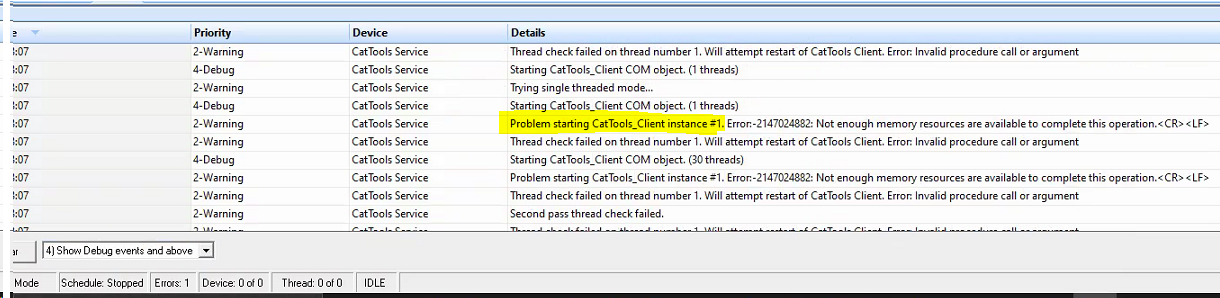
Problem starting CatTools_Client instance #1. Error:-2147024882: Not enough memory resources are available to complete this operation.<CR><LF>
Product section
Kiwi CatTools
Resolution
Reinstall Kiwi CatTools:
- Create a backup copy of the whole CatTools install folder (C:\Program Files (x86)\CatTools3)
- Uninstall Kiwi CatTools and reboot the machine
- Reinstall Kiwi CatTools
- After the install, stop the CatTools service through services.msc
- Copy the folders and files below from the backup CatTools folder and paste them into the current CatTools installation folder to overwrite them.
- Captured Data folder
- Configs folder
- Dated Configs folder
- Reports folder
- TFTP folder
- Variations folder
- KiwiCatTools-Settings.ini file
- KiwiDB-CatTools.kdb file
- KiwiDB-CatTools.ldb file
- Start the Kiwi CatTools service through services.msc
- Run the backup activity again