
Tools
Ports Required for Dameware
Port requirements of Dameware
First published date
10/30/2018 11:01 PM
Last published date
6/23/2023 9:51 PM
Overview
This is a reference of all ports used by Dameware to establish a connection to the remote machines. Normally, we use TCP and some UDP. Please refer to the table below.
If you need assistance opening these ports on your environment, please reach out to your Network Administrator or your vendor on how to open up these required ports.
If you need assistance opening these ports on your environment, please reach out to your Network Administrator or your vendor on how to open up these required ports.
Product section
Dameware Remote Support & Mini Remote Control
Cause
Required
Resolution
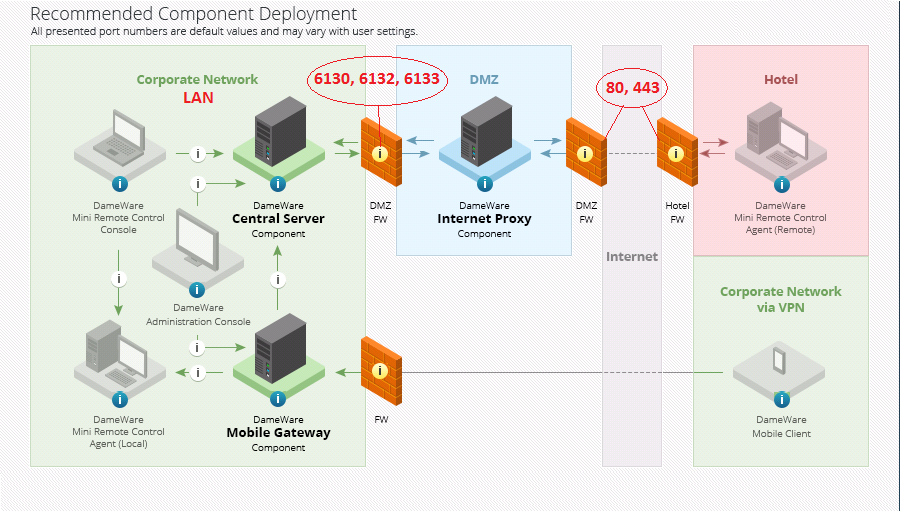
By default, Dameware listens and/or connects to the following ports:
To use Internet Session functionality, you must open port 443 in your organization's firewall to allow the Dameware Internet Proxy to communicate with users outside of your internal network.
| Port | Description | Direction | Used with | Change the default port in | Modify settings on | |
|---|---|---|---|---|---|---|
| 443 | Dameware Internet Proxy HTTPS - Used to connect computers through an Internet Session or download a Mini Remote Control or Internet Session agent | Incoming | Dameware Internet Proxy | The Configuration Wizard | N/A | |
| 6129 | Mini Remote Control protocol - Dameware agents listen on this port for incoming remote desktop connections | Incoming | Dameware Mini Remote Control | Dameware Mini Remote Control application | Mobile Client in Global Settings | |
| 6130 | Dameware Mobile Client Protocol - Gateway service listens on this port for incoming mobile connections | Incoming | Dameware Mobile Gateway | Administration Console or the Configuration Wizard | Mobile Client on the gateway login screen | |
| 6132 | Internet Session data stream between Mini Remote Control and the Dameware Internet Proxy | Bi-directional | Dameware Central Server Dameware Internet Proxy | The Configuration Wizard | N/A | |
| 6133 |
| Bi-directional | Dameware Central Server Dameware Internet Proxy Dameware Mobile Gateway | The Configuration Wizard | Remote Support, Mini Remote Control, and Administration consoles on the login screen | |
| Optional ports for specific Dameware features: | ||||||
| UDP 137 | Name Services port for File & Printer Sharing, User and Computer Authentication | Incoming | Dameware Remote Support Dameware Mini Remote Control Dameware Central Server | Windows systems settings | N/A | |
| 138 | Datagram Services port for File & Printer Sharing | Incoming | Dameware Remote Support Dameware Mini Remote Control | Windows systems settings | N/A | |
| 139 | Session Services port for File & Printer Sharing, User and Computer Authentication | Incoming |
| Windows systems settings | N/A | |
| TCP and UDP 445 | Direct Hosting, NetBIOS for File & Printer Sharing, User and Computer Authentication | Incoming | Dameware Remote Support Dameware Mini Remote Control Dameware Central Server | Windows systems settings | N/A | |
| 5900 | VNC default port | Incoming | Dameware Mini Remote Control Dameware Remote Support Dameware Central Server | MRC connection settings and in the VNC configuration server | MRC connection settings and in the VNC configuration server | |
| 88 | Kerberos V5 port | Incoming | Dameware Central Server | N/A | N/A | |
| 3389 | RDP port | Incoming | Dameware Mini Remote Control Dameware Remote Support Dameware Central Server | MRC connection settings and in Windows registry | MRC connection settings and in Windows registry | |
| Dynamic | NTLM port | N/A | Dameware Central Server | N/A | N/A | |
| 16993 | Accessing Intel AMT secure (SSL) | Incoming | Dameware Mini Remote Control Dameware Remote Support | MRC connection settings and in Intel AMT server | MRC connection settings and in Intel AMT server | |
| 16992 | Accessing Intel AMT secure (SSL) | Incoming | Dameware Mini Remote Control Dameware Remote Support | MRC connection settings and in Intel AMT server | MRC connection settings and in Intel AMT server | |
| UDP and TCP 389 | For LDAP to handle normal queries from client computers to the domain controllers | Incoming | Dameware Central Server | N/A | N/A | |
| TCP and UDP 53 | For DNS from client to domain controller and domain controller to domain controller | Incoming | Dameware Central Server | N/A | N/A | |
| TCP 636 | Computer Authentication over SLL | Incoming |
| N/A | N/A | |
To use Internet Session functionality, you must open port 443 in your organization's firewall to allow the Dameware Internet Proxy to communicate with users outside of your internal network.
Port Requirements