
Tools
Portecle not loading in Web Help Desk 12.7.6
After upgrading to WHD 12.7.6, running the Portecle batch file does not load the application. Note that this article also applies to newer versions of WHD when using Portecle, especially if WHD has been installed on drives other than drive C.
First published date
8/31/2021 5:45 PM
Last published date
4/1/2026 8:28 PM
Overview
Running <WebHelpDesk>/portecle.bat does not load the application in Web Help Desk 12.7.6. Also, Web Help Desk was installed on a different drive other than drive C.
Product section
Web Help Desk
Cause
1) The batch file was created and saved with the wrong Carriage Return (CR) as
Instead of
2) Web Help Desk is installed on a different drive
Resolution
Resolution 1:
1. Navigate to <WebHelpDesk> home folder
2. Rename "Portecle.bat" to "Portecle.bat_old"
3. Open the file "Portecle.bat_old" in Notepad
4. Copy the contents of the file
5. Open a new file in Notepad
6. Paste contents to the new file
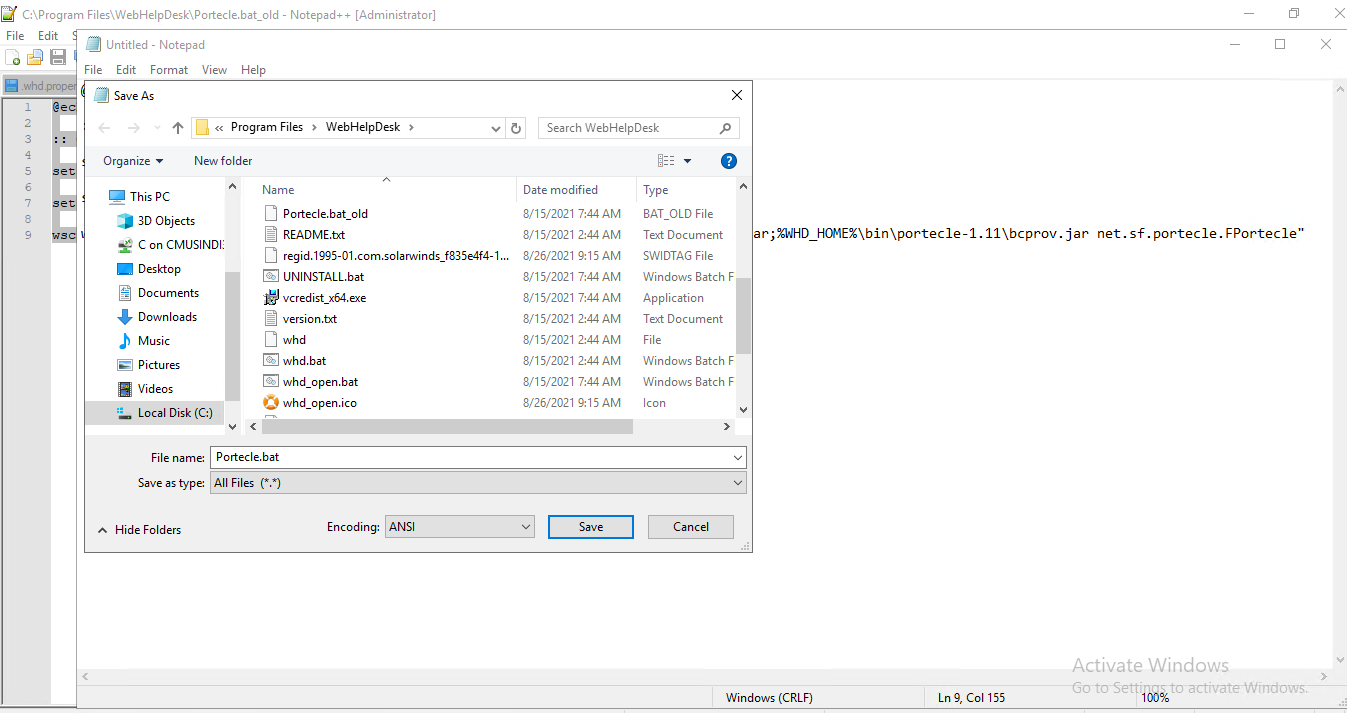
7. File > Save As >
File Name: Portecle.bat
Save as Type: All files (*.*)
to the same folder
Resolution 2:
Depending on what drives the Web Help Desk is installed, run the command below through CMD:
"D:\Program Files\WebHelpDesk\bin\jre\bin\java.exe" -cp "D:\Program Files\WebHelpDesk\bin\portecle-1.11\Portecle.jar";"D:\Program Files\WebHelpDesk\bin\portecle-1.11\bcprov.jar" net.sf.portecle.FPortecle
OR
"E:\Program Files\WebHelpDesk\bin\jre\bin\java.exe" -cp "E:\Program Files\WebHelpDesk\bin\portecle-1.11\Portecle.jar";"E:\Program Files\WebHelpDesk\bin\portecle-1.11\bcprov.jar" net.sf.portecle.FPortecle
1. Navigate to <WebHelpDesk> home folder
2. Rename "Portecle.bat" to "Portecle.bat_old"
3. Open the file "Portecle.bat_old" in Notepad
4. Copy the contents of the file
5. Open a new file in Notepad
6. Paste contents to the new file
7. File > Save As >
File Name: Portecle.bat
Save as Type: All files (*.*)
to the same folder
Resolution 2:
Depending on what drives the Web Help Desk is installed, run the command below through CMD:
"D:\Program Files\WebHelpDesk\bin\jre\bin\java.exe" -cp "D:\Program Files\WebHelpDesk\bin\portecle-1.11\Portecle.jar";"D:\Program Files\WebHelpDesk\bin\portecle-1.11\bcprov.jar" net.sf.portecle.FPortecle
OR
"E:\Program Files\WebHelpDesk\bin\jre\bin\java.exe" -cp "E:\Program Files\WebHelpDesk\bin\portecle-1.11\Portecle.jar";"E:\Program Files\WebHelpDesk\bin\portecle-1.11\bcprov.jar" net.sf.portecle.FPortecle