
Network Management
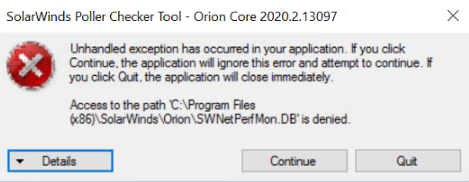
Poller Checker tool displays 'Unhandled exception' error
This article discusses when the poller Checker tool displays an 'Unhandled exception' error
First published date
5/2/2022 1:43 AM
Last published date
5/2/2022 2:07 AM
Overview
This discusses resolutions on how to handle when opening the polling checker tool and shows the following error:
Product section
Network Performance Monitor
Cause
- The owner of the service is not the local admin
- Lack of security permissions on SWNetperfmon.db
Resolution
- Set the local admin as the owner of the service
- Remote to Main Polling Engine
- Browse to C:\Program Files (x86)\SolarWinds\Orion
- Locate PollerChecker Tool
- Right click > Properties
- Go to Security tab > Advanced
- Change the owner to the local admin of the server
- Add authenticated user and provide access to c:\program Files(86)\Solarwinds\Orion\SWNetperfmon.db
- Remote to Main Polling Engine
- Proceed to path C:\Program Files (x86)\SolarWinds\Orion
- Locate SWNetperfmon.db file
- Right click > Properties
- Go to Security tab
- Click Advanced
- Click Add > Select a principal > Authenticated User > Check Names
- Click OK
- Click Full Control > OK
- Click Apply > OK