
Network Management
Perfstack Status Color Codes
This article describes the colors in the Perfstack status line since there is not a legend.
First published date
10/3/2019 7:34 PM
Last published date
3/9/2022 8:11 PM
Overview
The status line in Performance Analyzer (Perfstack) provides color codes in the results bar but not a legend.
Product section
Network Performance Monitor
Resolution
The status bar in Perfstack shows status with the following colors:
Here is an example showing up, warning, down, and up again:
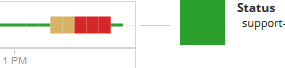
- Green is up
- Yellow is warning
- Red is down
- Blue is unmanaged
- Grey is unreachable
- Light green is external
Here is an example showing up, warning, down, and up again: