
Security Compliance
Patch Manager- Update Management fails due to multiple Servicing Stack Updates
Patch Manager- Update Management Fails due to Servicing Stack Updates
First published date
12/13/2019 11:33 PM
Last published date
12/13/2019 11:33 PM
Overview
When deploying the Update Management the task fails due to multiple Servicing Stack Updates.
Here is the error message is posted in the details of the task history.
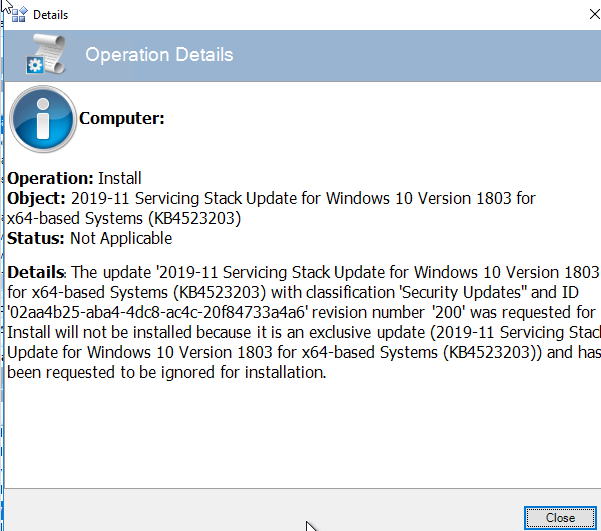
Here is an example of the job failing in the Patch Manager Task History window.

Here is the error message is posted in the details of the task history.
Here is an example of the job failing in the Patch Manager Task History window.
Product section
Patch Manager
Cause
Servicing stacks are exclusive updates and exclusive updates must be installed separately.
There is not a workaround for Exclusive Updates because this is set by Microsoft.
There is not a workaround for Exclusive Updates because this is set by Microsoft.
Resolution
Decline all Servicing Stack updates prior to the most current because they are a roll up that contains all previous updates.
This will ensure the task and updates install successfully
Here is a guidance document from Microsoft on how to deploy Servicing Stack Updates :
https://docs.microsoft.com/en-us/windows/deployment/update/servicing-stack-updates
Disclaimer: Please note, any content posted here is provided as a suggestion or recommendation to you for your internal use. This is not part of the SolarWinds software or documentation that you purchased from SolarWinds, and the information set forth herein may come from third parties. Your organization should internally review and assess to what extent, if any, such custom scripts or recommendations will be incorporated into your environment. You elect to use third party content at your own risk, and you will be solely responsible for the incorporation of the same, if any.
This will ensure the task and updates install successfully
Here is a guidance document from Microsoft on how to deploy Servicing Stack Updates :
https://docs.microsoft.com/en-us/windows/deployment/update/servicing-stack-updates
Disclaimer: Please note, any content posted here is provided as a suggestion or recommendation to you for your internal use. This is not part of the SolarWinds software or documentation that you purchased from SolarWinds, and the information set forth herein may come from third parties. Your organization should internally review and assess to what extent, if any, such custom scripts or recommendations will be incorporated into your environment. You elect to use third party content at your own risk, and you will be solely responsible for the incorporation of the same, if any.