
Security Compliance
Patch Manager-Error Code: 52E when connecting to the WSUS
When you attempt to connect to the WSUS-Error Code: 52E error is posted and the connection fails
First published date
12/16/2019 10:51 PM
Last published date
5/7/2026 3:44 PM
Overview
When connecting to WSUS server from PM console, you get the following error
Exception occurred at 5/7/2019 10:12:34 AM: logonuserwindowsimpersonate::Impersonate()::LogonUser() failed. Error Code: 52E
WSUSConnection::Unable to connect to the WSUS Server (WSUS) using the account: mydomain\myadminaccount
logonuserwindowsimpersonate::Impersonate()::LogonUser() failed. Error Code: 52E
Product section
Patch Manager
Cause
Error Code: 52E is actually an Active Directory error code that a failed login has occurred.
The account used to connect to the WSUS in the credential ring has the wrong password or is locked out.
The account used to connect to the WSUS in the credential ring has the wrong password or is locked out.
Resolution
Verify the account is not locked out in Active Directory
If you have changed the password on AD, follow the instructions below:
1. Update the password for the account in Patch Manager in Security and User Management
2. Select the account and click the change password.
3. Enter the password and confirm the password.
4. Click save.
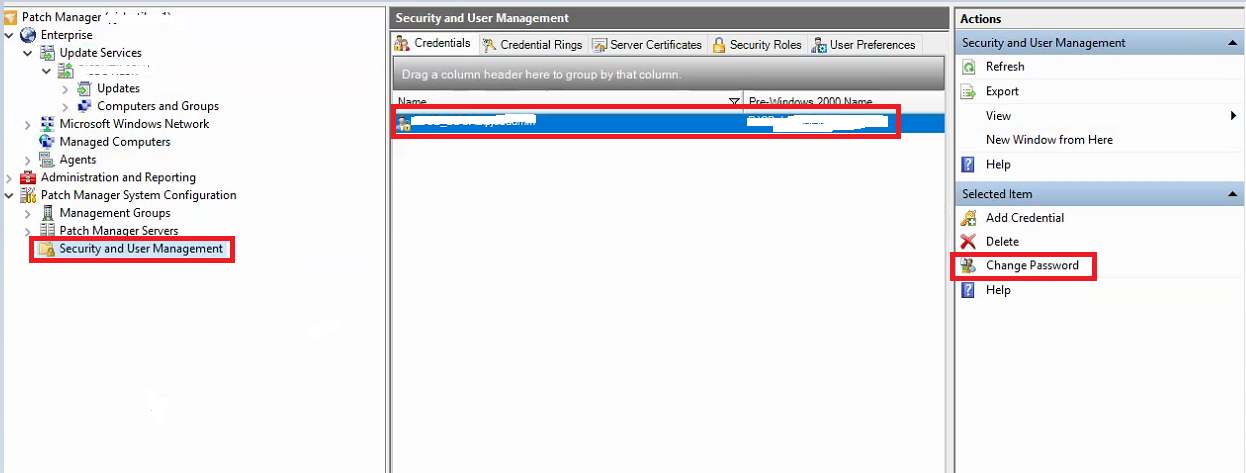
5. Once this has been done, you will be able to connect to the WSUS without an error present.
If you have changed the password on AD, follow the instructions below:
1. Update the password for the account in Patch Manager in Security and User Management
2. Select the account and click the change password.
3. Enter the password and confirm the password.
4. Click save.
5. Once this has been done, you will be able to connect to the WSUS without an error present.