
Security Compliance
Patch Manager Error Requested value 'month' was not found
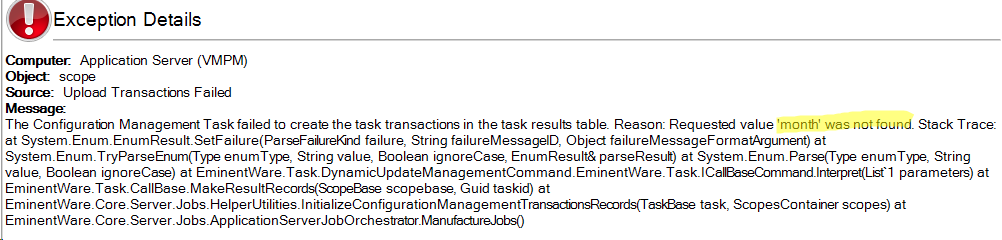
ERROR "Requested value 'month' was not found" related to Configuration Management Task. Patch Manager
First published date
5/14/2019 7:27 PM
Last published date
5/14/2019 7:27 PM
Overview
You may see the below ERROR "Requested value 'month' was not found" when you try to run any existing update management tasks that pre-existed before applying PM 2.1.5 HF2 or upgrading to PM 2.1.6 from a previous version.
Product section
Patch Manager
Cause
- An XML task definition file has a misspelled attribute for month
- Automation servers on older software
Resolution
- Find the attribute lastNMonthUnit="month" in scheduled task xml and replace it with the following lastNMonthUnit="months"
- There will possible be multiple folders that contain task.xml in C:\Program Files\SolarWinds\Patch Manager\Server\scheduled\*
- you can Use a tool like GrepWin on the parent folder C:\Program Files\SolarWinds\Patch Manager\Server\scheduled\ to perform a find and replace on all child folders and file.
- Or you can upgrade all Patch Consoles to the newest version as it was fixed in 2.1.7