
Network Management
Orion Platform can't connect to the Internet and thus cannot check for updates
The Orion Platform can't connect to the Internet and thus cannot check for updates. To upgrade your deployment, download updates to a computer with an Internet connection, copy the installer to your primary Orion Server, and run the Installer.
First published date
12/30/2021 4:06 PM
Last published date
4/20/2022 7:40 AM
Overview
Upon checking the Centralized Upgrade screen for updates, user is presented with an information message that the server cannot connect to online endpoints to check for available updates.
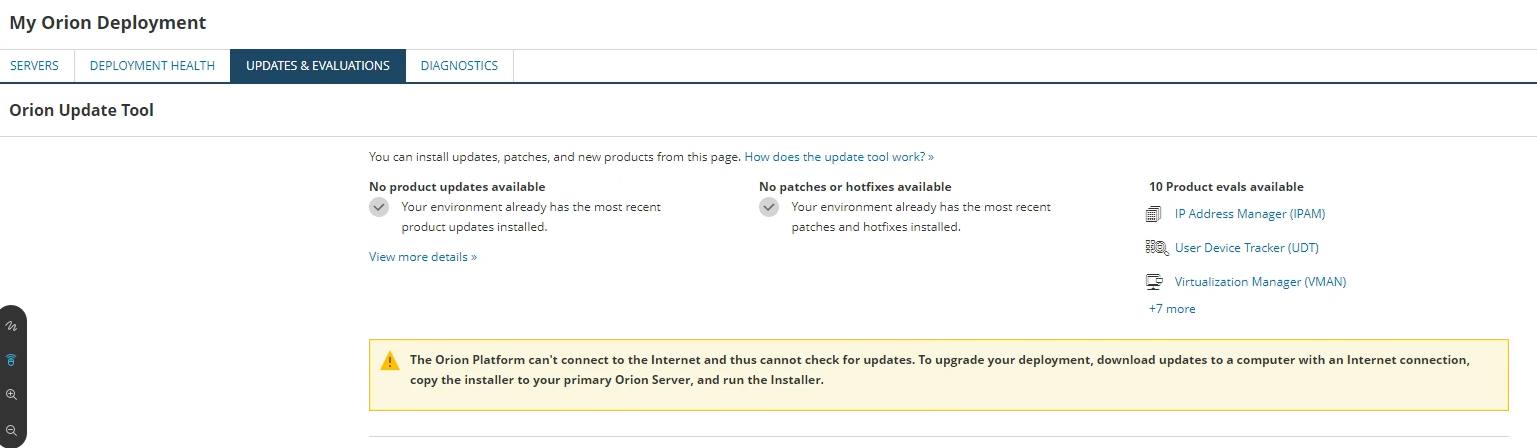
The Orion Platform can't connect to the Internet and thus cannot check for updates. To upgrade your deployment, download updates to a computer with an Internet connection, copy the installer to your primary Orion Server, and run the Installer.
The Orion Platform can't connect to the Internet and thus cannot check for updates. To upgrade your deployment, download updates to a computer with an Internet connection, copy the installer to your primary Orion Server, and run the Installer.
Product section
Orion Platform
Cause
- Can't connect to online endpoint upgrade servers
- Proxy is in use
Resolution
As of Orion Platform 2020.2.6 - Centralized Upgrade is not set up to utilize proxy settings. You must use falcon (standalone installer obtained in the customer portal). You must upgrade the main polling engine. Then you can utilize the Centralized Upgrade to upgrade scalability engines after the main poller has been updated.
If you would like for the Orion platform to be updated to allow for proxy settings, please inform SolarWinds Technical Support to submit an internal feature request. Upon the creation of this article, there was currently no public feature request open for voting on Thwack.com. So please create one so others can vote.
https://help.gizmo.gsx.com/knowledge-base/how-to/how-to-set-up-a-proxy-for-local-system-account-at-the-machine-level/
(Content provided by Martello Technologies, available at https://help.gizmo.gsx.com/knowledge-base/, obtained on Dec 30, 2021)
If you would like for the Orion platform to be updated to allow for proxy settings, please inform SolarWinds Technical Support to submit an internal feature request. Upon the creation of this article, there was currently no public feature request open for voting on Thwack.com. So please create one so others can vote.
Workaround
As an unsupported alternative, you may choose to set up a proxy for Local System account at the machine level. This can be done for the SolarWinds Administration Service (which handles upgrades).https://help.gizmo.gsx.com/knowledge-base/how-to/how-to-set-up-a-proxy-for-local-system-account-at-the-machine-level/
(Content provided by Martello Technologies, available at https://help.gizmo.gsx.com/knowledge-base/, obtained on Dec 30, 2021)