
Network Management
OLV LA - How to create a discard rule
This article discuses how you can create Discard rules on Orion Log Viewer or Log Analyzer
First published date
2/25/2020 3:45 PM
Last published date
2/25/2022 1:09 AM
Overview
To lessen the entries in the SolarWindslog db where OLV or OLM commit the syslog/traps entry. You can create a discard rule so we can still use OLV/OLM in Orion while maintaining the storage capacity of the SolarWindslog database
Product section
Network Performance Monitor
Resolution
1. Go to: 
2. Select Custom Rules
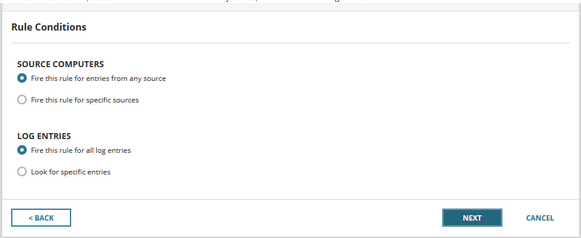
3. For the rules and conditions, select fire this rule for entries from any source, Fire this rule for all log entries
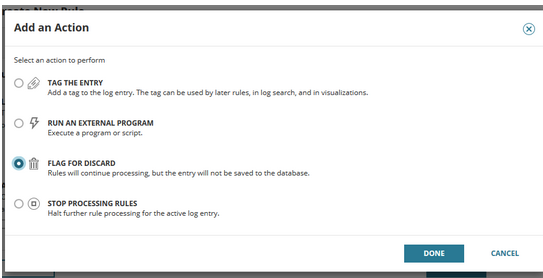
This will process the rule but will not commit an entry on the database
For traps and syslog that you need, you can filter the message pattern and Tag the Entry, If that is your company's needs.
For more information on creating Orion Log Viewer/Log Analyzer Rules, please see this article:
Create custom log-processing rules in OLV
Note on this:
For traps and Syslog that you do not need:
You can set a filter for all sources and all message patterns then discard the message. This means that you are not storing the traps and Syslog entries on the database.
2. Select Custom Rules
3. For the rules and conditions, select fire this rule for entries from any source, Fire this rule for all log entries
4. Select to discard the message:
This will process the rule but will not commit an entry on the database
For traps and syslog that you need, you can filter the message pattern and Tag the Entry, If that is your company's needs.
For more information on creating Orion Log Viewer/Log Analyzer Rules, please see this article:
Create custom log-processing rules in OLV
Note on this:
For traps and Syslog that you do not need:
You can set a filter for all sources and all message patterns then discard the message. This means that you are not storing the traps and Syslog entries on the database.