
Network Management
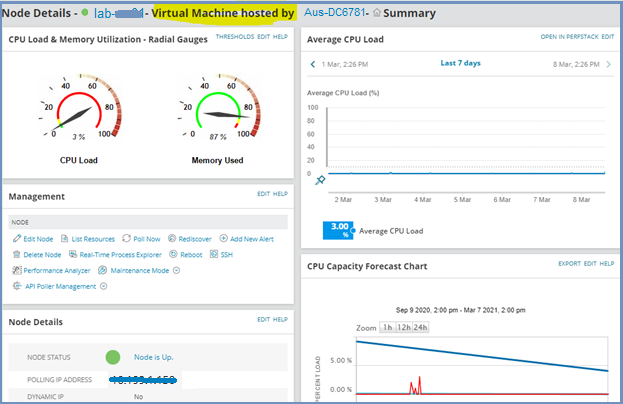
Node showing as a virtual machine hosted by X when it is a physical Linux node monitored via an agent
This article provides instructions to troubleshoot when Node Details is showing as a virtual machine hosted by X when it is a physical Linux node monitored via an agent
First published date
3/10/2021 10:14 AM
Last published date
3/4/2025 11:58 PM
Overview
Node Details shows that Node is a Virtual Machine hosted by X when it is a physical Linux Node monitored via an agent
Product section
Network Performance Monitor
Cause
This happens when NodeID is tagged to an incorrect IP address in VIM_Virtual Machine database table.
Resolution
- Obtain NodeID from Nodes database table
- Search VIM_VirtualMachines database table for the NodeID
- Checked that IP address doesn't match and does not exist in the Nodes database table.
- Perform the following to address the issue
- Launch Orion database manager.
- Execute the following to the Orion database.
	-- Scripts are not supported under any SolarWinds support program or service.
	-- Scripts are provided AS IS without warranty of any kind. SolarWinds further
	-- disclaims all warranties including, without limitation, any implied warranties
	-- of merchantability or of fitness for a particular purpose. The risk arising
	-- out of the use or performance of the scripts and documentation stays with you.
	-- In no event shall SolarWinds or anyone else involved in the creation,
	-- production, or delivery of the scripts be liable for any damages whatsoever
	-- (including, without limitation, damages for loss of business profits, business
	-- interruption, loss of business information, or other pecuniary loss) arising
    -- out of the use of or inability to use the scripts or documentation.

UPDATE VIM_VirtualMachines SET NodeID = NULL
WHERE IPAddress = 'XX.XX.XX.XX'