
Network Management
Network Discovery - Add Active Directory DC: The server is not operational error
When creating a new Active Directory Discovery from APE, credential test fails with error: The server is not operational.
First published date
3/16/2024 1:42 PM
Last published date
2/19/2025 10:28 PM
Overview
Scenario: You have MPE in DMZ and APE outside and DC cannot reach MPE due to enforced firewall policy blocking MPE from accessing DC.
You are creating a new AD Discovery via APE (outside DMZ) and fill in the AD details as below and click Test, throws error.
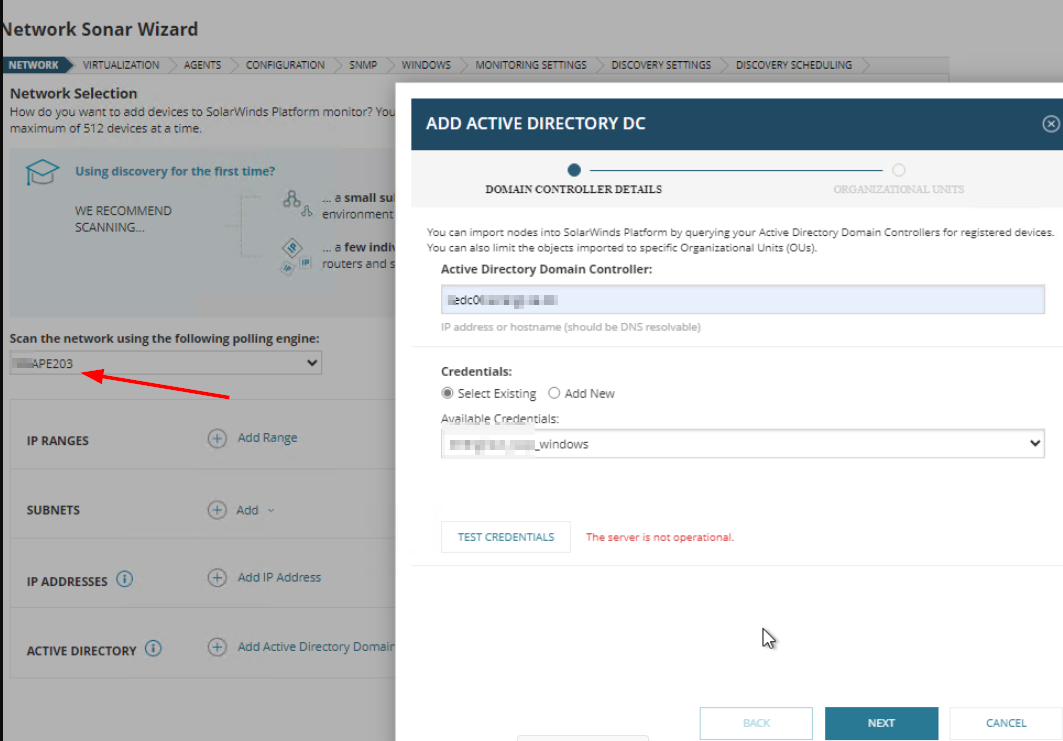
You verified AD connectivity from APE and it is accessible.
You are creating a new AD Discovery via APE (outside DMZ) and fill in the AD details as below and click Test, throws error.
You verified AD connectivity from APE and it is accessible.
Product section
Orion Platform
Cause
Unknown
Resolution
- Create a new discovery profile, selecting the designated polling engine.
- Add any IP in the IP ADDRESS field.
- Go through the remaining steps to set up the profile and Save it.
- Edit the discovery profile, remove the IP and add the AD server.
- Test credentials should be successful.