
Network Management
NetPath Endpoint Latency Thresholds in NPM
This article explains how to adjust endpoint latency thresholds for Netpath. This can be helpful if you know the usual latency to expect and help adjust to that it relates to the latency that can be a problem.
First published date
11/14/2018 2:31 PM
Last published date
3/14/2022 1:20 PM
Overview
This article explains how to adjust endpoint latency thresholds for Netpath. This can be helpful if you know the usual latency to expect and help adjust this to the latency that can be a problem.
Product section
Network Performance Monitor
Cause
N/A
Resolution
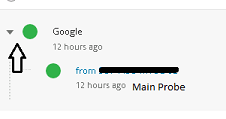
1. Expand the Probe by clicking the right arrow
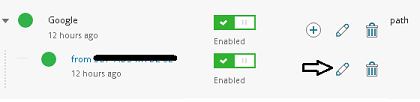
2. Click on the "Edit" button (pencil) of the probe
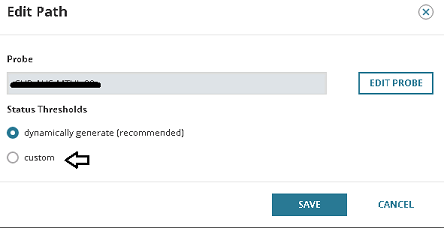
3. Select Custom on Status Thresholds.
2. Click on the "Edit" button (pencil) of the probe
3. Select Custom on Status Thresholds.
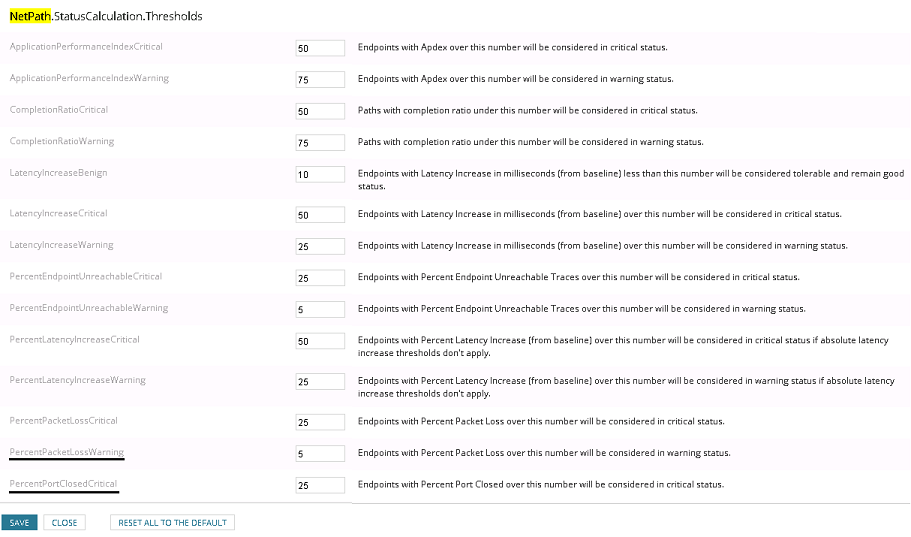
4. Here you can adjust the thresholds for this probe only. To make global changes, you will need to go to the Advanced Configuration page in the Orion Web Console accessed from the following address:
https://THENAMEOFYOURWEBCONSOLE/Orion/Admin/AdvancedConfiguration/Global.aspx