
Security Compliance
ARM NetAPP Logga scan throws error "The remote server returned an error: (401) Unauthorized"
This article provide steps on how to resolve NetAPP logga scan failing with error "The remote server returned an error: (401) Unauthorized" in Access Righter Manager
First published date
2/5/2020 4:07 PM
Last published date
10/4/2023 9:22 AM
Overview
You configured the NetAPP C Mode Logga in ARM for example with the following configuration using a Service account for scan and logga
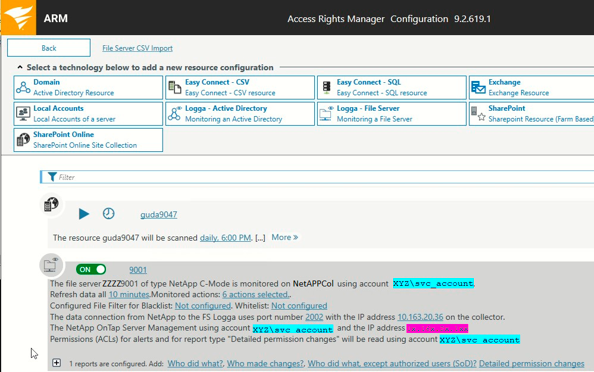
However the scans are not completing successfully and you see following errors in pntracer.log
However the scans are not completing successfully and you see following errors in pntracer.log
[    355|ZZZZ9087    |pnTracer    |4696.1|  1|XYZ\svc_account  |pn.tracer.netapp.cm….FPolicyManagerCMode|190918| 9:22:59.829|Error      ]                 FPolicyManagerCMode.Start(String[] name): NetApp.Manage.NaAuthException: Incorrect credentials for 1x.16x.2x.1xx ---> System.Net.WebException: The remote server returned an error: (401) Unauthorized.
--BEGIN-OF-EXCEPTION------------------------------------------------------------
NetApp.Manage.NaAuthException: Incorrect credentials for 1x.16x.2x.1xx ---> System.Net.WebException: The remote server returned an error: (401) Unauthorized.
   at System.Net.HttpWebRequest.GetResponse()
   at NetApp.Manage.HTTPClient.DoRequest()
   --- End of inner exception stack trace ---
   at NetApp.Manage.NaServer.InvokeElem(NaElement element)
   at pn.tracer.netapp.cmode.ontap.OntapManagement.ListExternalEngines(NaServer server)
   at pn.tracer.netapp.cmode.ontap.OntapManagement.ConnectToNetApp(String ipAddr, Int32 port)
   at pn.tracer.netapp.cmode.FPolicyManagerCMode.Start(String[] name)
--END-OF-EXCEPTION---
Product section
Access Rights Manager
Cause
- PDC is rejecting the logon because the service account is restricted to resources on Secondary DC
- The domain part of the user configured in the FS Logga configuration is not the same as the one configured in the Netapp device (considering domain format and case sensitive).
Resolution
1. First check if the same file is following line as INFO:
5. You can check with Active Directory tools the account and where the account can log on:
(Screenshots property of © 2023 Microsoft)
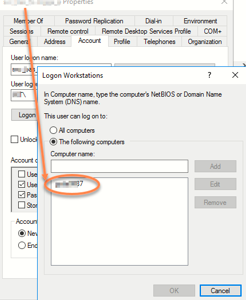
6. Normally you would use the option all computer and that is the only one which works.
Additional Hints:
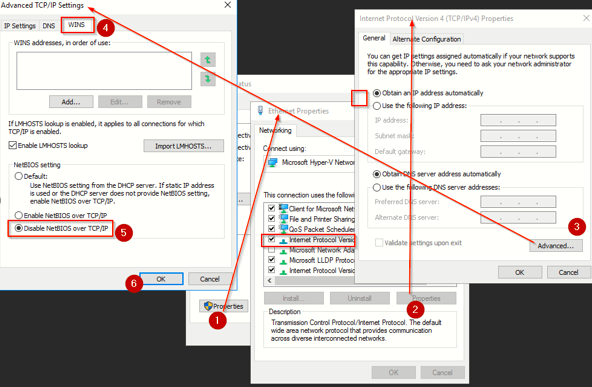
Sometime there is a problem with the NetBIOS over TCP/IP options within the network configuration. It might be helpful, to disable it.
(Screenshots property of © 2023 Microsoft)
7. If the above looks fine and the highlighted config below looks different in the FS Logga config in ARM Config----Scans, like XYZ.Local\svc_account or XyZ\svc_account it would hard fail on the Netapp and throw the same error again. If this the case make sure the entry is exactly the same as entered in the Netapp. Please consider it case sensitive.

FPolicyManagerCMode.readParameters(String[] items): --serverSocketPort=2002, --serverSocketIp=1x.16x.2x.3x, --clusterMngtIp=1x.16x.2x.1xx, --ontapiUserName=svc_account, --ontapiUserDomain=XYZ, --ontapiUserPwd=........., --useSSL=false,2. Validate that with the configuration:
clusterMngtIp=1x.16x.2x.1xx
ontapiUserName=svc_account
ontapiUserDomain=XYZ
3. On the NetAPP check following - It is important to make sure that the settings on storage are correct:
cluster::> vserver fpolicy show -vserver vserver1 -instance

        Vserver: vserver1
         Policy: 8manlogga
Sequence Number: 1
         Status: on
FPolicy Engine: engine_8manlogga

cluster::> vserver fpolicy policy show -vserver vserver1 -policy-name 8manlogga -instance

                        Vserver: vserver1
                         Policy: 8manlogga
              Events to Monitor: event_8manlogga_cifs
                 FPolicy Engine: engine_8manlogga
Is Mandatory Screening Required: false
        Allow Privileged Access: no
User Name for Privileged Access: -
    Is Passthrough Read Enabled: false

cluster::> vserver fpolicy show-engine -node xyz001n01 -vserver vserver1 -instance

                                   Node: storage_node_name
                                Vserver: vserver1
                                 Policy: 8manlogga
                                 Server: server_IP_address
                          Server Status: connected
                            Server Type: primary
      Time FPolicy Server was Connected: 9/30/2019 10:50:40
   Time FPolicy Server was Disconnected: -
Reason for FPolicy Server Disconnection: -
    ID for FPolicy Server Disconnection: -
                             Session ID: xxxxxxxx-xxxx-xxxx-xxxx-xxxxxxxxxxxx

cluster::> vserver fpolicy policy external-engine show -vserver vserver1 -instance

                                Vserver: vserver1
                                 Engine: engine_8manlogga
                Primary FPolicy Servers: server_IP_address
         Port Number of FPolicy Service: 2002
              Secondary FPolicy Servers: -
                   External Engine Type: asynchronous
  SSL Option for External Communication: no-auth           <-- Here I changed this option in order to disable the SSL use. It was just for testing purpose and it worked.
             FQDN or Custom Common Name: -
           Serial Number of Certificate: -
                  Certificate Authority: -
          Is Resiliency Feature Enabled: false
Maximum Notification Retention Duration: 3m
     Directory for Notification Storage: -

cluster::> vserver fpolicy policy external-engine modify -vserver vserver1 -engine-name engine_8manlogga -SSl-option no-auth
                             no-auth     server-auth mutual-auth

cluster::> set advanced
Warning: These advanced commands are potentially dangerous; use them only when directed to do so by NetApp personnel.
Do you want to continue? {y|n}: y

cluster::*> security login show -vserver vserver1

Vserver: vserver1
                             Authentication             Acct   Is-Nsswitch
User/Group Name  Application Method    Role Name        Locked Group
---------------- ----------- --------- ---------------- ------ -----------
XYZ\svc_account  ontapi      domain    8manrole         -      no

cluster::*> security login role show -vserver vserver1 -role 8manrole
           Role          Command/                                      Access
Vserver    Name          Directory                               Query Level
---------- ------------- --------- ----------------------------------- --------
vserver1  8manrole      DEFAULT                                       none
                         version                                       readonly
                         volume                                        readonly
                         vserver                                       readonly
                         vserver fpolicy                               all
5 entries were displayed.

cluster::> vserver fpolicy policy event show -vserver vserver1
          Event                        File                       Is Volume
Vserver   Name               Protocols Operations    Filters      Operation
--------- ------------------ --------- ------------- ------------ ------------
vserver1 event_8manlogga_   cifs      create,       first-read,  false
          cifs                        create_dir,   first-write,
                                      delete,       open-with-
                                      delete_dir,   delete-
                                      read, write,  intent
                                      rename,
                                      rename_dir,
                                      setattr, open
4. 0xc0000070 means the DC is rejecting the logon because the service account is restricted on the computer where he can logon.5. You can check with Active Directory tools the account and where the account can log on:
(Screenshots property of © 2023 Microsoft)
6. Normally you would use the option all computer and that is the only one which works.
Additional Hints:
Sometime there is a problem with the NetBIOS over TCP/IP options within the network configuration. It might be helpful, to disable it.
(Screenshots property of © 2023 Microsoft)
7. If the above looks fine and the highlighted config below looks different in the FS Logga config in ARM Config----Scans, like XYZ.Local\svc_account or XyZ\svc_account it would hard fail on the Netapp and throw the same error again. If this the case make sure the entry is exactly the same as entered in the Netapp. Please consider it case sensitive.