
Applications Systems
Need to find proper way to alert on individual Virtual Machine component volume space utilization in VMAN Orion
The individual mount points of a Virtual Machine is displayed in the 'Component Volumes' resource in the web console when VMan Orion polling is enabled BUT in alerts the Virtual Machine Mount Point is not available to be selected as a field for the trigger condition or a variable in email notification.
First published date
8/29/2019 1:40 AM
Last published date
10/7/2019 6:09 AM
Overview
In a stand-alone setup of VMAN Orion where there is no option to enable node polling and set either SNMP or WMI polling to get the server volume data, there is currently no way to create a report to display the individual volume capacity nor is there any option in alerts to select individual mount points, Only the Volume Summary Free Space percent is available but is not really a good target for alerting since say for example the server has 10 drives, and 2 are 98% full while the rest are 20% or less full, the Volume Summary free percent will still look ok since the other 8 drives still has a lot of space left and you will not immediately know that 2 of the drives are already almost full.
Product section
Virtualization Manager
Cause
The mount point data is stored in a separate table in the DB.
In order to associate a Virtual machine to a mountpoint you will need to join the VIM_VirtualMachines and VIM_VirtualMachineVolumes table. This is not possible in the standard GUI based web alert.
The percent utilization value is also not saved in the db table, you will need to include the calculations in your select query as well.
Component Volumes Resource sample: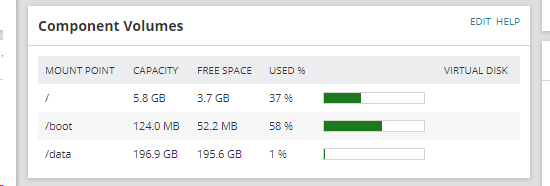
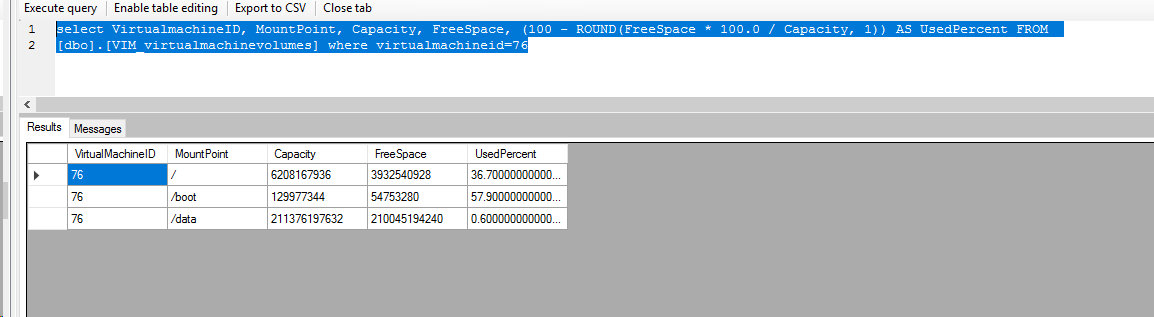
Equivalent query in my lab:
select VirtualmachineID, MountPoint, Capacity, FreeSpace, (100 - ROUND(FreeSpace * 100.0 / Capacity, 1)) AS UsedPercent FROM
[dbo].[VIM_virtualmachinevolumes] where virtualmachineid=76
-- Scripts are not supported under any SolarWinds support program or service.
-- Scripts are provided AS IS without warranty of any kind. SolarWinds further
-- disclaims all warranties including, without limitation, any implied warranties
-- of merchantability or of fitness for a particular purpose. The risk arising
-- out of the use or performance of the scripts and documentation stays with you.
-- In no event shall SolarWinds or anyone else involved in the creation,
-- production, or delivery of the scripts be liable for any damages whatsoever
-- (including, without limitation, damages for loss of business profits, business
-- interruption, loss of business information, or other pecuniary loss) arising
-- out of the use of or inability to use the scripts or documentation.
In order to associate a Virtual machine to a mountpoint you will need to join the VIM_VirtualMachines and VIM_VirtualMachineVolumes table. This is not possible in the standard GUI based web alert.
The percent utilization value is also not saved in the db table, you will need to include the calculations in your select query as well.
Component Volumes Resource sample:
Equivalent query in my lab:
select VirtualmachineID, MountPoint, Capacity, FreeSpace, (100 - ROUND(FreeSpace * 100.0 / Capacity, 1)) AS UsedPercent FROM
[dbo].[VIM_virtualmachinevolumes] where virtualmachineid=76
-- Scripts are not supported under any SolarWinds support program or service.
-- Scripts are provided AS IS without warranty of any kind. SolarWinds further
-- disclaims all warranties including, without limitation, any implied warranties
-- of merchantability or of fitness for a particular purpose. The risk arising
-- out of the use or performance of the scripts and documentation stays with you.
-- In no event shall SolarWinds or anyone else involved in the creation,
-- production, or delivery of the scripts be liable for any damages whatsoever
-- (including, without limitation, damages for loss of business profits, business
-- interruption, loss of business information, or other pecuniary loss) arising
-- out of the use of or inability to use the scripts or documentation.
Resolution
But as a work around you can use custom SQL for the trigger condition, Custom sql for variables.
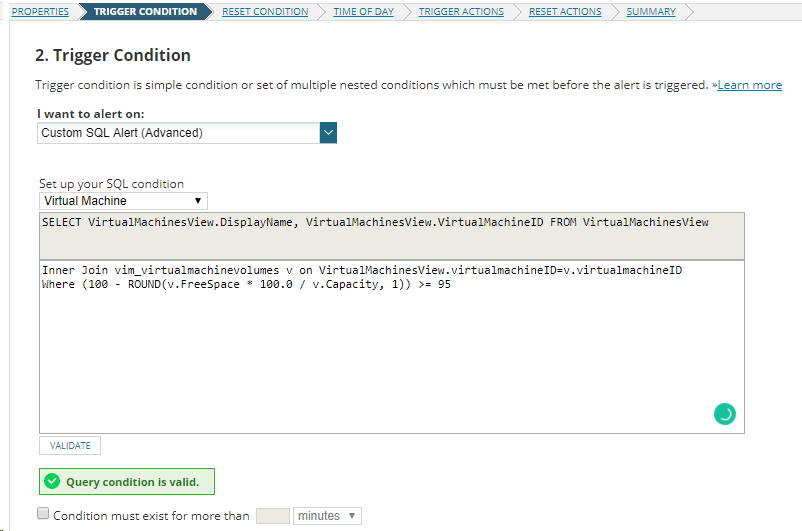
For Space Used percent over 94% you can use this Trigger condition:
Custom SQL, select Virtual Machine and add the following:
-- Scripts are provided AS IS without warranty of any kind. SolarWinds further
-- disclaims all warranties including, without limitation, any implied warranties
-- of merchantability or of fitness for a particular purpose. The risk arising
-- out of the use or performance of the scripts and documentation stays with you.
-- In no event shall SolarWinds or anyone else involved in the creation,
-- production, or delivery of the scripts be liable for any damages whatsoever
-- (including, without limitation, damages for loss of business profits, business
-- interruption, loss of business information, or other pecuniary loss) arising
-- out of the use of or inability to use the scripts or documentation.
Try this as the variable to display the affected drives in the email message:
------------------------------------------------------------------------------------------------------------
-- Scripts are provided AS IS without warranty of any kind. SolarWinds further
-- disclaims all warranties including, without limitation, any implied warranties
-- of merchantability or of fitness for a particular purpose. The risk arising
-- out of the use or performance of the scripts and documentation stays with you.
-- In no event shall SolarWinds or anyone else involved in the creation,
-- production, or delivery of the scripts be liable for any damages whatsoever
-- (including, without limitation, damages for loss of business profits, business
-- interruption, loss of business information, or other pecuniary loss) arising
-- out of the use of or inability to use the scripts or documentation.
------------------------------------------------------------------------------------------------------------
Note: If your regular select query returns more than one result, swis won't list them in this alert message box which is why I had to use the query above instead of just using the query below.
select MountPoint FROM
[dbo].[VIM_virtualmachinevolumes] where virtualmachineid=${N=SwisEntity;M=VirtualMachineID} and (100 - ROUND(FreeSpace * 100.0 / Capacity, 1)) >= 95
UPDATE:
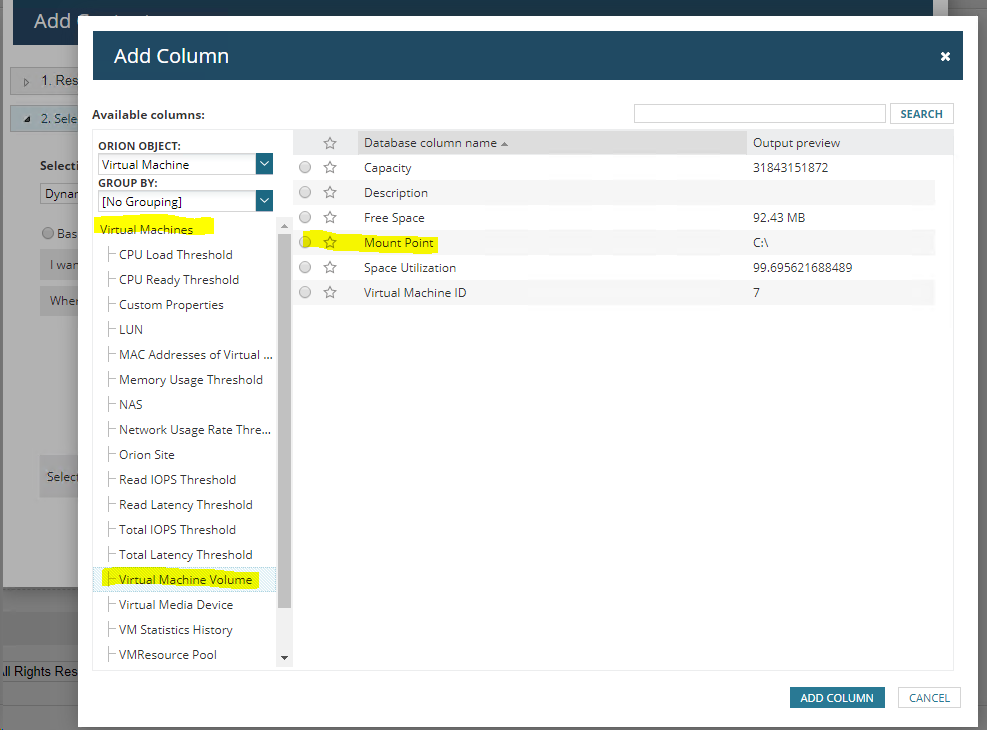
In core 2019.2, the Virtual Machine object now has a subcategory Virtual Machine Volume where you can report on guest Mount point capacity. So you no longer need custom SQL for reports BUT it's still not yet available in Alerts.
For Space Used percent over 94% you can use this Trigger condition:
Custom SQL, select Virtual Machine and add the following:
Inner Join vim_virtualmachinevolumes v on VirtualMachinesView.virtualmachineID=v.virtualmachineID
Where (100 - ROUND(v.FreeSpace * 100.0 / v.Capacity, 1)) >= 95
-- Scripts are not supported under any SolarWinds support program or service.
-- Scripts are provided AS IS without warranty of any kind. SolarWinds further
-- disclaims all warranties including, without limitation, any implied warranties
-- of merchantability or of fitness for a particular purpose. The risk arising
-- out of the use or performance of the scripts and documentation stays with you.
-- In no event shall SolarWinds or anyone else involved in the creation,
-- production, or delivery of the scripts be liable for any damages whatsoever
-- (including, without limitation, damages for loss of business profits, business
-- interruption, loss of business information, or other pecuniary loss) arising
-- out of the use of or inability to use the scripts or documentation.
Try this as the variable to display the affected drives in the email message:
------------------------------------------------------------------------------------------------------------
Virtual Machine Name : ${N=SwisEntity;M=Name}

MountPoint:  ${SQL: Select COALESCE (substring(
(
Select ','+v.mountpoint AS [text()]
From VIM_VirtualMachineVolumes v
Where  (100 - ROUND(v.FreeSpace * 100.0 / v.Capacity, 1)) >89
and v.virtualmachineid=${N=SwisEntity;M=VirtualMachineID}
ORDER BY v.mountpoint
For XML PATH ('')
), 2, 1000), 'There are no volumes with less than 10% free space.') as drives
 }
-- Scripts are not supported under any SolarWinds support program or service.-- Scripts are provided AS IS without warranty of any kind. SolarWinds further
-- disclaims all warranties including, without limitation, any implied warranties
-- of merchantability or of fitness for a particular purpose. The risk arising
-- out of the use or performance of the scripts and documentation stays with you.
-- In no event shall SolarWinds or anyone else involved in the creation,
-- production, or delivery of the scripts be liable for any damages whatsoever
-- (including, without limitation, damages for loss of business profits, business
-- interruption, loss of business information, or other pecuniary loss) arising
-- out of the use of or inability to use the scripts or documentation.
------------------------------------------------------------------------------------------------------------
Note: If your regular select query returns more than one result, swis won't list them in this alert message box which is why I had to use the query above instead of just using the query below.
select MountPoint FROM
[dbo].[VIM_virtualmachinevolumes] where virtualmachineid=${N=SwisEntity;M=VirtualMachineID} and (100 - ROUND(FreeSpace * 100.0 / Capacity, 1)) >= 95
UPDATE:
In core 2019.2, the Virtual Machine object now has a subcategory Virtual Machine Volume where you can report on guest Mount point capacity. So you no longer need custom SQL for reports BUT it's still not yet available in Alerts.