Network Management
NPM Real-Time polling is not available for some entities
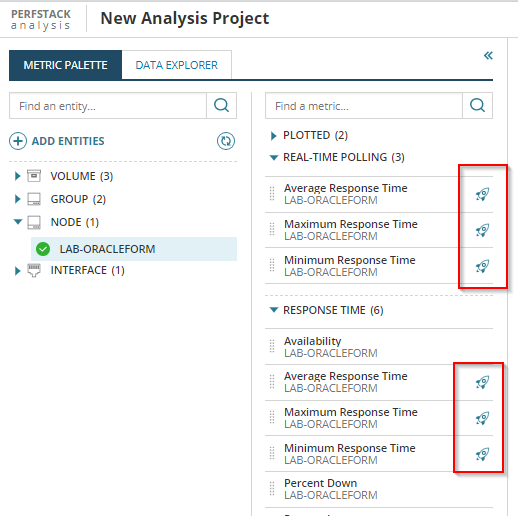
For some entities added to PerfStack, no metrics are available under the Real-Time polling section and the "rocket ship" icon is not present for any metrics on the entities.
First published date
10/29/2018 8:54 PM
Last published date
4/17/2025 3:31 PM
Overview
For some entities added to PerfStack, no metrics are available under the Real-Time polling section and the "rocket ship" icon is not present for any metrics on the entities.
Product section
Network Performance Monitor
Cause
These entities with no metrics available are polled via Orion Agent. The issue is caused by one of the following reasons:
- On your Agent server, you do not have the required .NET Framework version. Real-time polling for agents requires .NET Framework 4.8 (release 528040) or later.
- You have not added a real-time resource (resources with the "rocket ship" icon) to your PerfStack board.
Resolution
Polling via Orion Agents
To resolve the issues when the entity is polled via an Orion Agent, follow the steps below.-
Check the .NET Framework version on the Agent server:
-
Open the Registry Editor.
-
Go to the following key: HKEY_LOCAL_MACHINE \ software \ Microsoft \ NET Framework Setup \ NDP \ v4 \ Full
-
Search for Version or Release. The required .NET Framework version is 4.8 or later.
Note: If you couldn't find the .NET Framework version under "Full", check the "Setup" key or search for a key labeled by a number. Version information for .NET 4.5 and earlier is located under "Setup" or under a key that has a number as its name.
-
-
If the .NET Framework version is earlier than 4.8 (release 528040), upgrade .NET Framework on the target server. Reboot the server to complete the upgrade.
-
Reboot the target server again to ensure that the Agent gets updated.
Note: It might take some time after the reboot for the Real-time polling to become available.
No real-time resources available in the PerfStack project
Add a real-time resource to the PerfStack project. These resources are marked by the rocket ship icon in the metric palette.