
Network Management
NCM Authentication fails for Palo Alto
Connection to the Palo Alto device fails to connect due to login challenge
First published date
1/27/2022 7:47 PM
Last published date
1/6/2023 6:13 AM
Overview
When adding Palo Alto devices in NCM, connection fails to connect due to a login challenge.
Product section
Network Configuration Manager
Cause
Palo Alto device presents a login challenge and forces the user to acknowledge a Security Advisory when trying to connect through its CLI interface. User needs to type 'yes' before the password prompt is presented to the user.
Resolution
On versions newer than NCM 8.0, login challenge was added to the Out ot the Box device template. Make sure that the Device Template of the node being added is the default out of the box template for Palo Alto and “Use Keyboard Interactive Authentication” is enabled.
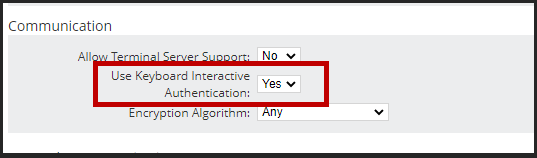

When checking the device template, this commands should be present:
<Command Name="LoginChallengeQuestionPrompt" Value="\(yes\/no\)\s:"/>
<Command Name="LoginChallengeAnswer" Value="yes" />
When checking the device template, this commands should be present:
<Command Name="LoginChallengeQuestionPrompt" Value="\(yes\/no\)\s:"/>
<Command Name="LoginChallengeAnswer" Value="yes" />