
Applications Systems
Monitor and Alert on Thread Count of a Process
Determine the number of instances of a process or service. Monitor process thread count of process or service. Number of processes running.
First published date
7/23/2019 4:35 PM
Last published date
8/10/2022 2:25 PM
Overview
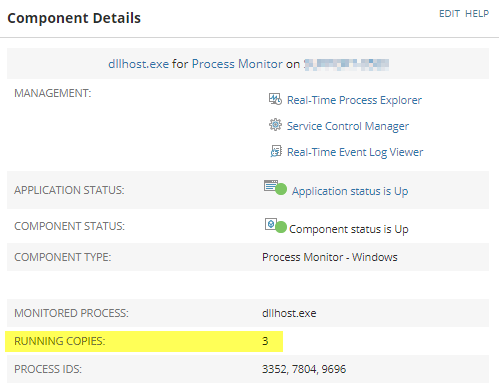
Monitor and alert off of a the "Thread Count" of a process. By default, a Process Monitor within SAM will monitor thread count. See image. However, you cannot simply alert off of this object without the use of custom SQL/SWQL. This data can be obtained an alternative way which allows the statistic to be alerted when it reaches a desired value. This can be done by creating a Windows Performance Counter component monitor and alerting off of the statistic value.
Product section
Server Application Monitor
Resolution
Create a performance counter monitor using the Component Monitor Wizard.
- For assistance - visit the How-To article on the Component Monitor Wizard.
- When choosing the Performance Counter - select "Process" in the Performance Object.
- Choose the process name.
- Go to Settings > All Settings > Manage Alerts.
- Click 'Create New Alert'.
- On the Trigger Conditions page, choose a 'Component' based alerts in the drop-down for alert type.
- To trigger on a specific value of thread count, choose 'Process Instance Count (component Alerting Properties)'.
- [Optional] In the email action for programmed trigger actions, you may use variables to identify process name and thread count: ${N=SwisEntity;M=ComponentAlert.ComponentName} has a value of ${N=SwisEntity;M=ComponentAlert.ProcessInstanceCount}
- Submit the new alert to save changes.