
Network Management
Map integer values to text values in alert variables
Map integer status values into a string or text value so that it is human-readable or makes sense to the user. Custom alerting variables, custom SQL alert variables. Alert Email Variables.
First published date
6/5/2020 2:59 PM
Last published date
6/5/2020 3:00 PM
Overview
This demonstrates how to easily map integer type values to a string value that can be meaningful and human-readable. This can be useful if alerting variables do not exist. Here is an example of this in action.
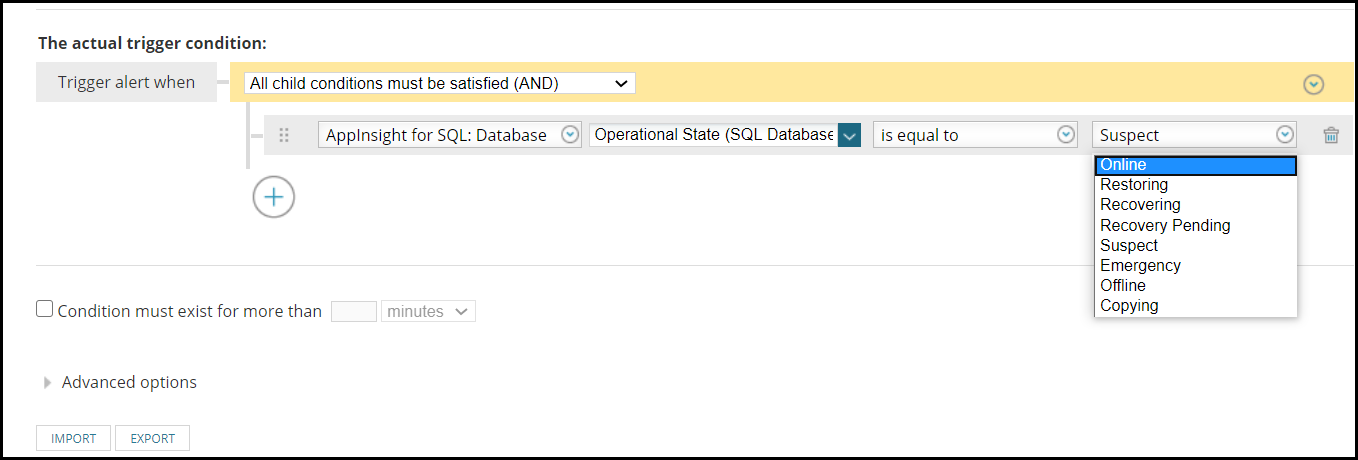
Notice the trigger conditions of the alert show text values.
However, notice when creating an Email Action that the variable is an integer.
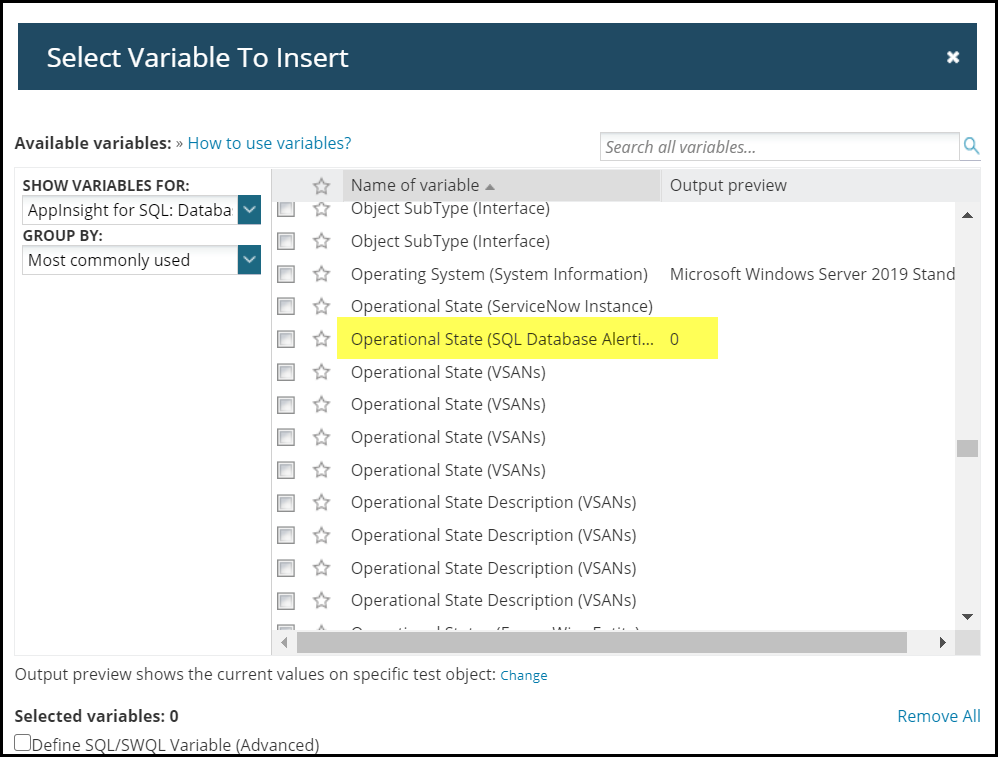
Often this isn't very useful to know the integer status. Therefore, this article was created to address this.
It is recommended to contact support to verify that text version variables do not already exist. Sometimes it is difficult to find the alert variable due to the large number of alerting variables that exist.
Notice the trigger conditions of the alert show text values.
However, notice when creating an Email Action that the variable is an integer.
Often this isn't very useful to know the integer status. Therefore, this article was created to address this.
It is recommended to contact support to verify that text version variables do not already exist. Sometimes it is difficult to find the alert variable due to the large number of alerting variables that exist.
Product section
Orion Platform
Resolution
Once it has been confirmed that a text mapped variable does not exist. The next step is to create a custom SQL variable and map values. You can use Database Manager to help develop your query (Use Database Manager to view the SolarWinds database). You may also use SWQL Studio if you're comfortable using the SolarWinds Query Language (Download the SolarWinds Orion SDK and start using SWQL).
The following query will help in searching the database for columns containing specific text. Replace the alphabet with the search string.
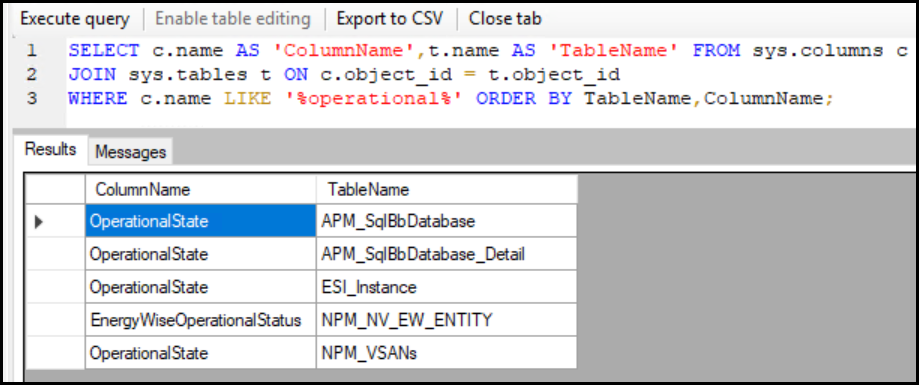
Continuing with the example started near the top of this article with the alert for SQL Database Operation Status; this looks in the database for the appearence of 'operational'.
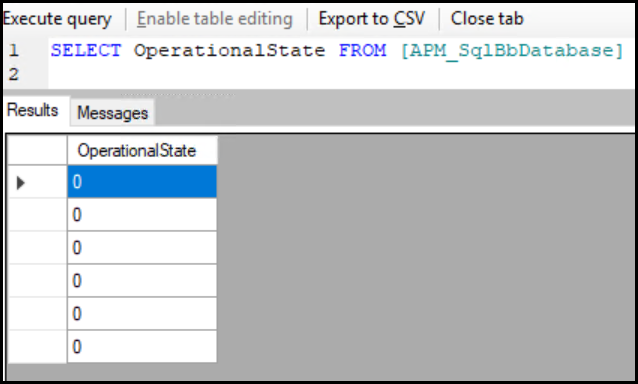
Once the table has been located, start developing a SQL query to select the required data.
Utilize a SQL Case expression to map the values. More details available here:
https://docs.microsoft.com/en-us/sql/t-sql/language-elements/case-transact-sql?view=sql-server-ver15 (© 2020 Microsoft, available at https://docs.microsoft.com, obtained on June 5, 2020)
Example.
Note: you can (and probably will need to) use a SWIS alert variable inside of your sql variable to identify which object to display. In the case of the example shown in this article, you will want to identify WHICH database you want to output operational state for. Otherwise, it will just output the operational state of the first database that is present in your Orion database, which is not what you want.
Here is the final product in this example:
Disclaimer: Please note, any content posted herein is provided as a suggestion or recommendation to you for your internal use. This is not part of the SolarWinds software or documentation that you purchased from SolarWinds, and the information set forth herein may come from third parties. Your organization should internally review and assess to what extent, if any, such custom scripts or recommendations will be incorporated into your environment. You elect to use third party content at your own risk, and you will be solely responsible for the incorporation of the same, if any.
The following query will help in searching the database for columns containing specific text. Replace the alphabet with the search string.
-- Scripts are not supported under any SolarWinds support program or service.
-- Scripts are provided AS IS without warranty of any kind. SolarWinds further
-- disclaims all warranties including, without limitation, any implied warranties
-- of merchantability or of fitness for a particular purpose. The risk arising
-- out of the use or performance of the scripts and documentation stays with you.
-- In no event shall SolarWinds or anyone else involved in the creation,
-- production, or delivery of the scripts be liable for any damages whatsoever
-- (including, without limitation, damages for loss of business profits, business
-- interruption, loss of business information, or other pecuniary loss) arising
-- out of the use of or inability to use the scripts or documentation.
SELECT c.name AS 'ColumnName',t.name AS 'TableName' FROM sys.columns c
JOIN sys.tables t ON c.object_id = t.object_id
WHERE c.name LIKE '%ABCDEFGHIJKLMNOPQRSTUVWXYZ%' ORDER BY TableName,ColumnName;
Continuing with the example started near the top of this article with the alert for SQL Database Operation Status; this looks in the database for the appearence of 'operational'.
Once the table has been located, start developing a SQL query to select the required data.
Utilize a SQL Case expression to map the values. More details available here:
https://docs.microsoft.com/en-us/sql/t-sql/language-elements/case-transact-sql?view=sql-server-ver15 (© 2020 Microsoft, available at https://docs.microsoft.com, obtained on June 5, 2020)
Example.
SELECT
    OperationalState
    ,CASE
    WHEN OperationalState = 0 THEN 'Online'
	WHEN OperationalState = 1 THEN 'Restoring'
	WHEN OperationalState = 2 THEN 'Recovering'
	WHEN OperationalState = 3 THEN 'Recovery Pending'
	WHEN OperationalState = 4 THEN 'Suspect'
	WHEN OperationalState = 5 THEN 'Emergency'
	WHEN OperationalState = 6 THEN 'Offline'
	WHEN OperationalState = 7 THEN 'Copying'
        Else 'Not Found'
    End AS OperationalStringStatus
FROM APM_SQLBbDatabase
  WHERE ID = '1' -- Use this to identify which database
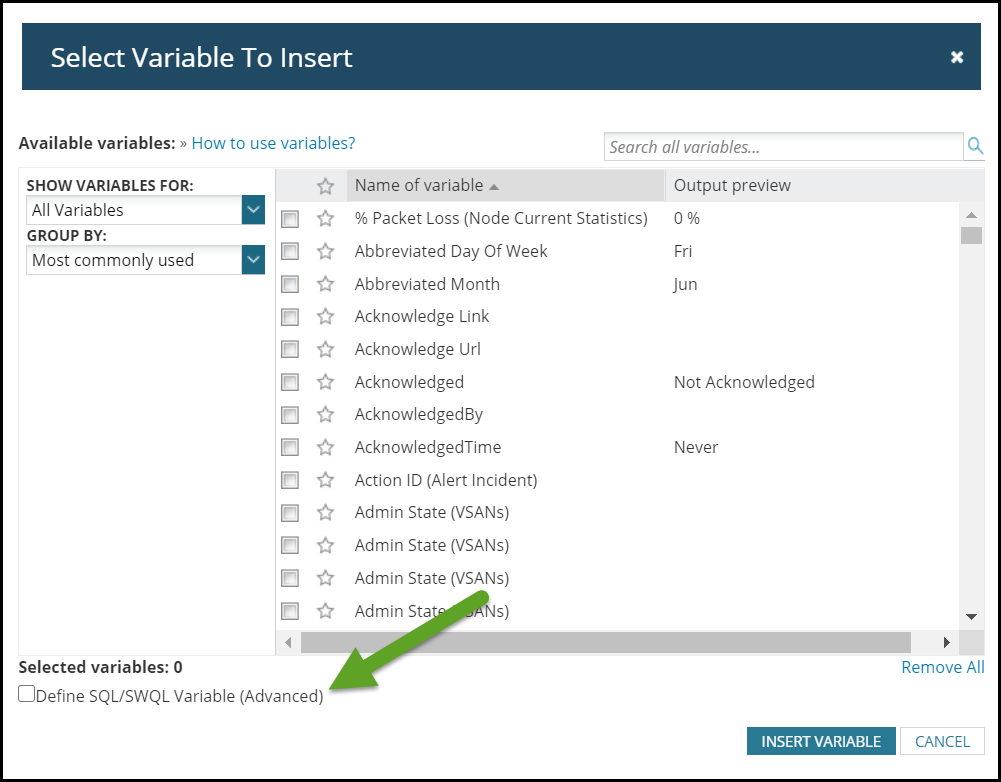
Next, define your custom SQL alert variable.
Note: you can (and probably will need to) use a SWIS alert variable inside of your sql variable to identify which object to display. In the case of the example shown in this article, you will want to identify WHICH database you want to output operational state for. Otherwise, it will just output the operational state of the first database that is present in your Orion database, which is not what you want.
Here is the final product in this example:
${SQL: SELECT
    CASE
        WHEN OperationalState = 0 THEN 'Online'
	WHEN OperationalState = 1 THEN 'Restoring'
	WHEN OperationalState = 2 THEN 'Recovering'
	WHEN OperationalState = 3 THEN 'Recovery Pending'
	WHEN OperationalState = 4 THEN 'Suspect'
	WHEN OperationalState = 5 THEN 'Emergency'
	WHEN OperationalState = 6 THEN 'Offline'
	WHEN OperationalState = 7 THEN 'Copying'
        Else 'Not Found'
    End AS OperationalStringStatus
FROM APM_SQLBbDatabase
  WHERE ID = ${N=SwisEntity;M=SqlDatabaseAlert.DatabaseID}}
Disclaimer: Please note, any content posted herein is provided as a suggestion or recommendation to you for your internal use. This is not part of the SolarWinds software or documentation that you purchased from SolarWinds, and the information set forth herein may come from third parties. Your organization should internally review and assess to what extent, if any, such custom scripts or recommendations will be incorporated into your environment. You elect to use third party content at your own risk, and you will be solely responsible for the incorporation of the same, if any.