
Application Management
Papertrail ANSI Log Colorization examples
This document shows how to set log colors with ANSI escape code examples
First published date
6/25/2021 6:10 PM
Last published date
6/25/2021 6:10 PM
Overview
Colors makes logs more readable. While this guide shows how to colorize logs with CSS and log frameworks, this doc has simple examples how to colorize using a different method.
Product section
Papertrail
Cause
A quick reference for setting log/text colors in the syslog message field.
Resolution
Make sure to enable 'Colorize Logs' in Settings > Event Viewer
Here are the examples:
A screenshot of the output from the Papertrail Event viewer:
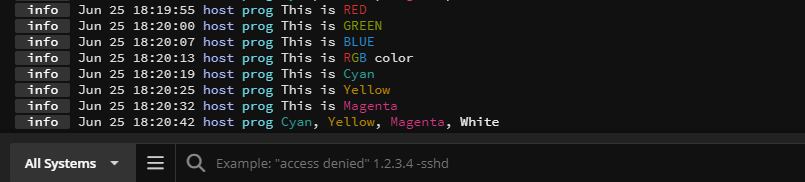
Here are the examples:
<14>1 - host prog - - - This is \e[31mRED\e[0m
<14>1 - host prog - - - This is \e[32mGREEN\e[0m
<14>1 - host prog - - - This is \e[34mBLUE\e[0m
<14>1 - host prog - - - This is \e[31mR\e[32mG\e[34mB\e[0m color
<14>1 - host prog - - - This is \e[36mCyan\e[0m
<14>1 - host prog - - - This is \e[33mYellow\e[0m
<14>1 - host prog - - - This is \e[35mMagenta\e[0m
<14>1 - host prog - - - \e[36mCyan\e[0m, \e[33mYellow\e[0m, \e[35mMagenta\e[0m, \e[37mWhite
A screenshot of the output from the Papertrail Event viewer: