
Network Management
Log Alert to a File stopped working after upgrading Orion
Upgraded to 2020.2.1 HF2 and alert actions for creating log file are not working. Alert actions are failing. Value cannot be null. Parameter name: String
First published date
12/28/2020 4:53 PM
Last published date
3/29/2022 3:14 PM
Overview
Upon upgrading to Orion 2020.2.1 HF2, the alert actions for 'Log Alert to a file' stop working. This is a known issue tracked by the SolarWinds Development team.
Navigating to the Alert action log will provide more insight.
C:\ProgramData\SolarWinds\Logs\Orion\ActionsExecutionAlert.log
Simulating the action visibly fails
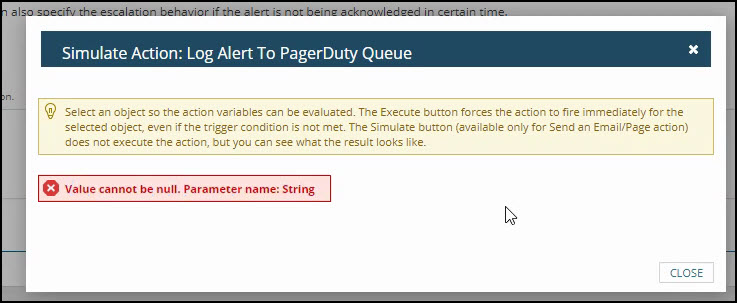
Navigating to the Alert action log will provide more insight.
C:\ProgramData\SolarWinds\Logs\Orion\ActionsExecutionAlert.log
ERROR AlertingLogger - (null)  Action [Action: ID: 197, ActionType: WriteToFile, Title: Log Recovery to PagerDuty Queue, Description: Logs the Alert to a text file, Enabled: True, Order: 1 , Context: SolarWinds.Orion.Core.Models.Actions.Contexts.AlertingActionContext, EnviromentType: Alerting, ExecutionMode: Reset, EntityType: Orion.APM.Component, EntityUri: swis://HRZ-Orion01-CRP.payoneer.com/Orion/Orion.Nodes/NodeID=1426/Applications/ApplicationID=884/Components/ComponentID=282220, AlertContext: AlertName: Alert me via PagerDuty when a component goes into warning or critical state, CreatedBy: admin, AlertActiveId: 523345, AlertObjectId: 20006] execution has failed.
System.ArgumentNullException: Value cannot be null.
Parameter name: String
   at System.Number.StringToNumber(String str, NumberStyles options, NumberBuffer& number, NumberFormatInfo info, Boolean parseDecimal)
   at System.Number.ParseInt32(String s, NumberStyles style, NumberFormatInfo info)
   at SolarWinds.Orion.Core.Actions.Impl.WriteToFile.WriteToFileConfiguration.Load(ActionDefinition action, IMacroParser macroParser)
   at SolarWinds.Orion.Core.Actions.Impl.WriteToFile.WriteToFileExecutor.LoadConfiguration()
   at SolarWinds.Orion.Core.Actions.Impl.WriteToFile.WriteToFileExecutor.ExecuteInternal()
   at SolarWinds.Orion.Core.Actions.ActionExecutorBase.Execute(IServiceProvider serviceProvider, ActionDefinition definition, ActionContextBase context, CancellationToken cancellationToken)
Simulating the action visibly fails
Product section
Orion Platform
Cause
Unknown
Resolution
- Take a backup of the database table: [dbo].[ActionsProperties]. Nightly database backups would be sufficient since this table does not usually receive many changes day to day. You can also grab quick backup with:
SELECT * INTO [ActionsPropertiesBackup] FROM [ActionsProperties]
- Run the following query.
INSERT [dbo].ActionsProperties
 SELECT a.ActionID, 'Credentials', ''
 FROM dbo.Actions a
 LEFT JOIN dbo.ActionsProperties ap ON a.ActionID = ap.ActionID AND ap.PropertyName = 'Credentials'
 WHERE ActionTypeID = 'WriteToFile'
 AND ap.ActionID IS NULL