
Network Management
License Server Error on a High availability pool
License server error, Menu Failure. The License Store is inaccessible. Restore connectivity to Main Poller <hostname> in order to view or add licenses. SolarWinds.Orion.Licensing.Client.WcfLicensingChannelFactory. Channel LicenseServerContract to net.tcp://hostname:17777/orion/licensing/licenseserver failed: System.ServiceModel.EndpointNotFoundException: There was no endpoint listening
First published date
6/15/2020 8:33 PM
Last published date
2/10/2025 1:22 AM
Overview
The following behavior can be found in the web console.
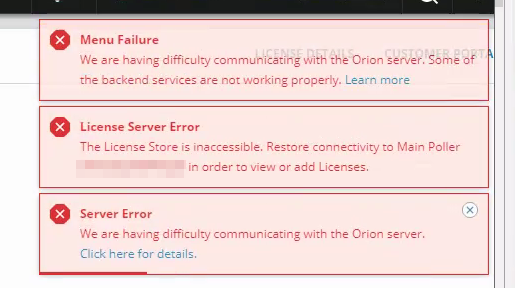
The License Business Layer displays
Event Viewer shows
- Missing menu bar
- License Server Error messages in upper right
- Menu Failure message in upper right
The License Business Layer displays
ERROR SolarWinds.Orion.Licensing.Client.WcfLicensingChannelFactory`1 - Channel LicenseServerContract to net.tcp://<redacted>:17777/orion/licensing/licenseserver failed: System.ServiceModel.EndpointNotFoundException: There was no endpoint listening at net.tcp://<redacted>:17777/orion/licensing/licenseserver that could accept the message. This is often caused by an incorrect address or SOAP action. See InnerException, if present, for more details.
Event Viewer shows
Could not refresh license. Connectivity error: 'There was no endpoint listening at net.tcp://<redacted>:17777/orion/licensing/licenseserver that could accept the message. This is often caused by an incorrect address or SOAP action. See InnerException, if present, for more details.'.
Product section
Orion Platform
Cause
Corrupted license store.
Resolution
Reset The License Store
It is advised to reset the license store. Please follow:Corrupted license store in Orion
High Availability Environments
If the issue persists, and the server is in a High Availability failover pool, ensure the pool members are set properly.Check the following registry.
SolarWinds strongly recommends that you back up your registry before making any edits to your system registry. You should only edit the registry if you are experienced and confident in doing so. Using a registry editor incorrectly can cause serious issues with your operating system. SolarWinds cannot guarantee resolution to any damage resulting from making registry edits.
HKEY_LOCAL_MACHINE > SOFTWARE > Wow6432Node > SolarWinds > High AvailabilityInstallType and RunType must match values. The main preferred should say: MainPoller and the secondary: MainPollerStandby. Reboots are required for changes.
Contact SolarWinds if the issues persists further. Or visit the below links.