
Network Management
Using the Legacy Report Migration Tool in Orion
This article will discuss how to utilize the Legacy Report migration tool to enable you to migrate legacy reports created in the Report Writer to the web.
First published date
4/14/2022 10:44 PM
Last published date
12/5/2024 5:42 PM
Overview
In Orion Platform 2020.2.6, the Report Writer tool is removed from the Orion Platform. Reports created from the Report Writer will no longer be accessible unless the reports are migrated to the web using the Legacy Report Migration Tool.
Product section
Orion Platform
Cause
Legacy reports are no longer available in Orion Platform 2020.2.6 and newer.
Resolution
The only way to keep the legacy reports starting from Orion Platform 2020.2.6 and newer is by using the Legacy Report Migration Tool.
1. RDP to the Orion Server.
2. Go to the installation path of SolarWinds. By default, SolarWinds is located at
C:\Program Files (x86)\SolarWinds\Orion
3. Scroll down and look for LegacyReportMigration.exe.
(Screenshots property of © 2022 Microsoft)
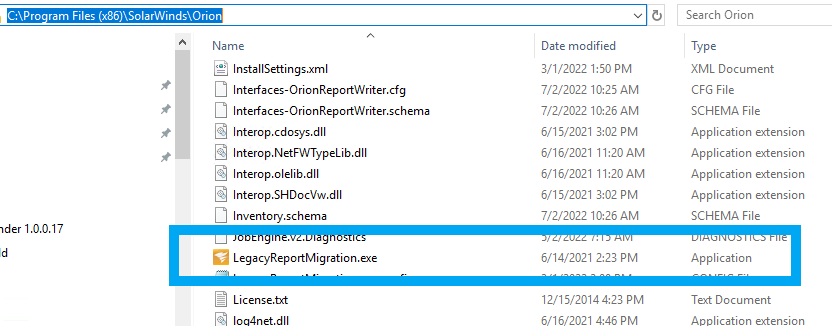
4. Run the LegacyReportMigration.exe.
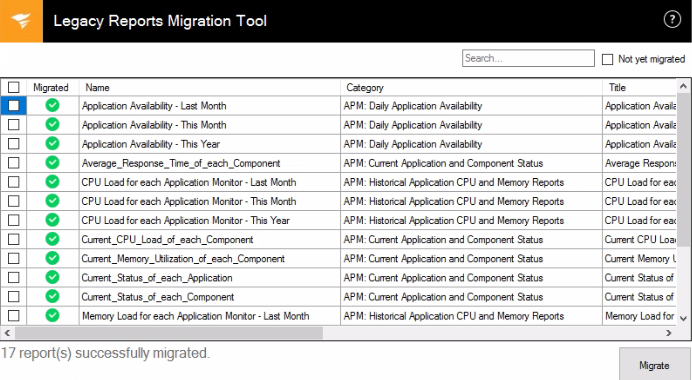
5. It will automatically detect your legacy reports in the environment.
6. Select all the reports.
7. Then click on Migrate.
8. The report will now be migrated.
1. RDP to the Orion Server.
2. Go to the installation path of SolarWinds. By default, SolarWinds is located at
C:\Program Files (x86)\SolarWinds\Orion
3. Scroll down and look for LegacyReportMigration.exe.
(Screenshots property of © 2022 Microsoft)
4. Run the LegacyReportMigration.exe.
5. It will automatically detect your legacy reports in the environment.
6. Select all the reports.
7. Then click on Migrate.
8. The report will now be migrated.