
Network Management
Latest CDR/CMR files are not being downloaded by VNQM
This article will discuss an issue regarding the latest CDR/CMR files in FTP located is not being pulled up by VNQM
First published date
6/4/2019 3:40 PM
Last published date
3/23/2023 10:23 PM
Overview
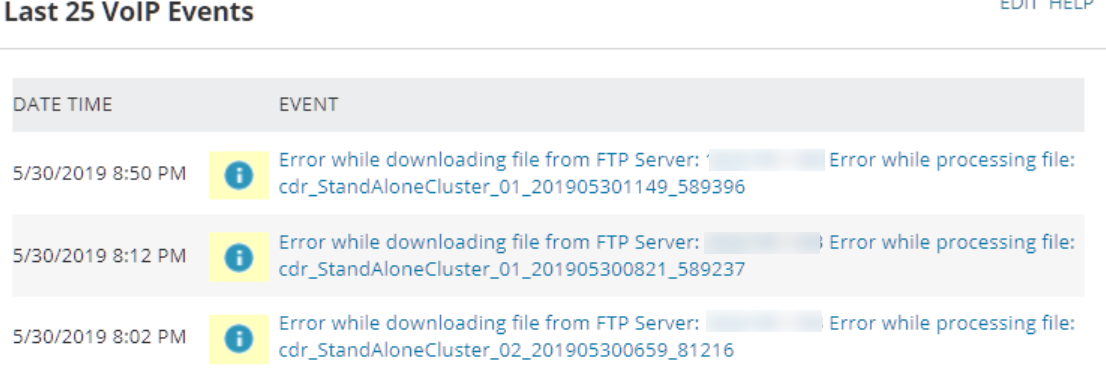
Voip events showing that the CDRs cannot be downloaded from the FTP server as seen below.
Checking the log file in IpSlam.Ftp.job shows that there is a timeout warning when VNQM is trying to get the files list.
2019-06-03 12:20:05,110 [STP SmartThreadPool Thread #0] INFO SolarWinds.Orion.IpSla.Jobs.Ftp.CiscoCcmFtpClient - CDRFTP - Getting sorted file list [Server:xxx.xxx.xxx.xxx], [Directory:/]
2019-06-03 12:29:35,033 [15] WARN SolarWinds.Orion.IpSla.Jobs.Ftp.CiscoCcmFtpJob - CDRFTP - Finishing job due internal timeout...
2019-06-03 12:29:35,033 [15] INFO SolarWinds.Orion.IpSla.Jobs.Ftp.FtpDLXIpSlaFtpSession - Disconnecting by request from outside
2019-06-03 12:29:35,033 [15] WARN SolarWinds.Orion.IpSla.Jobs.Ftp.CiscoCcmFtpJob - CDRFTP - Job finished...
2019-06-03 12:29:36,861 [STP SmartThreadPool Thread #0] INFO SolarWinds.Orion.IpSla.Jobs.Ftp.CiscoCcmFtpClient - CDRFTP - Processing file list
2019-06-03 12:29:40,689 [STP SmartThreadPool Thread #0] INFO SolarWinds.Orion.IpSla.Jobs.Ftp.CiscoCcmFtpClient - CDRFTP - Returning sorted file list [filesCount:982]
2019-06-03 12:29:40,705 [STP SmartThreadPool Thread #0] INFO SolarWinds.Orion.IpSla.Jobs.Ftp.CiscoCcmFtpClient - CDRFTP - Begin downloading files [server:xxx.xxx.xxx.xxx directory:]
2019-06-03 12:29:40,720 [STP SmartThreadPool Thread #0] WARN SolarWinds.Orion.IpSla.Jobs.Ftp.CiscoCcmFtpClient - CDRFTP - Cancelling download [fileName:cdr_StandAloneCluster_01_201905310402_589636 (134)]
Checking the log file in IpSlam.Ftp.job shows that there is a timeout warning when VNQM is trying to get the files list.
2019-06-03 12:20:05,110 [STP SmartThreadPool Thread #0] INFO SolarWinds.Orion.IpSla.Jobs.Ftp.CiscoCcmFtpClient - CDRFTP - Getting sorted file list [Server:xxx.xxx.xxx.xxx], [Directory:/]
2019-06-03 12:29:35,033 [15] WARN SolarWinds.Orion.IpSla.Jobs.Ftp.CiscoCcmFtpJob - CDRFTP - Finishing job due internal timeout...
2019-06-03 12:29:35,033 [15] INFO SolarWinds.Orion.IpSla.Jobs.Ftp.FtpDLXIpSlaFtpSession - Disconnecting by request from outside
2019-06-03 12:29:35,033 [15] WARN SolarWinds.Orion.IpSla.Jobs.Ftp.CiscoCcmFtpJob - CDRFTP - Job finished...
2019-06-03 12:29:36,861 [STP SmartThreadPool Thread #0] INFO SolarWinds.Orion.IpSla.Jobs.Ftp.CiscoCcmFtpClient - CDRFTP - Processing file list
2019-06-03 12:29:40,689 [STP SmartThreadPool Thread #0] INFO SolarWinds.Orion.IpSla.Jobs.Ftp.CiscoCcmFtpClient - CDRFTP - Returning sorted file list [filesCount:982]
2019-06-03 12:29:40,705 [STP SmartThreadPool Thread #0] INFO SolarWinds.Orion.IpSla.Jobs.Ftp.CiscoCcmFtpClient - CDRFTP - Begin downloading files [server:xxx.xxx.xxx.xxx directory:]
2019-06-03 12:29:40,720 [STP SmartThreadPool Thread #0] WARN SolarWinds.Orion.IpSla.Jobs.Ftp.CiscoCcmFtpClient - CDRFTP - Cancelling download [fileName:cdr_StandAloneCluster_01_201905310402_589636 (134)]
Product section
VoIP & Network Quality Manager
Cause
This can be caused by a large amount of CDR/CMR files saved on the FTP location which is the culprit on why the file listing timed out.
Resolution
1. Remotely access the FTP server where the CDR and CMR files are being saved
2. Verify how many CDR/CMR files saved on the FTP and check the dates (the error message above was observed from an environment having more than 10k of CDRs/CMRs files)
3. Reduce the number of files (i.e. retain files with dates from the last 3 months) and verify if VNQM will be able to download the latest CDRs and CMRs.
2. Verify how many CDR/CMR files saved on the FTP and check the dates (the error message above was observed from an environment having more than 10k of CDRs/CMRs files)
3. Reduce the number of files (i.e. retain files with dates from the last 3 months) and verify if VNQM will be able to download the latest CDRs and CMRs.