
Tools
Kiwi Syslog update checker fails
This article shows how to troubleshoot an issue where the Kiwi Syslog update checker fails with an error when clicked.
First published date
4/5/2021 8:19 AM
Last published date
4/5/2021 8:19 AM
Overview
By design, the Kiwi Syslog application can check available updates by connecting to the Solarwinds Customer Portal https://customerportal.solarwinds.com/ if you go to:
Kiwi Syslog Service Manager Console > Help > Check for updates...
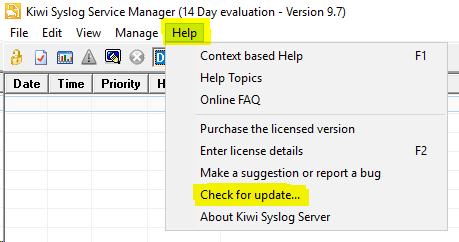
There are instances when this will fail with an error showing below.

Kiwi Syslog Service Manager Console > Help > Check for updates...
There are instances when this will fail with an error showing below.
Product section
Kiwi Syslog Server
Cause
- Kiwi Syslog Server do not have Internet Connection.
- TLS version in Kiwi Syslog not compatible with the TLS version supported by the Solarwinds Customer Portal https://customerportal.solarwinds.com/
Resolution
- Please check and ensure that the Kiwi Syslog Server has internet connection.
- If the Kiwi Syslog Server uses a Proxy server to connect to the Internet, please configure the server with proper proxy settings. You can ask for assistance with your server administrator for this as it is outside of Kiwi Syslog application.
- If you encounter the error mentioned above in the Kiwi Syslog error log, it is about the TLS version that the Kiwi Syslog server is using that might not be compatible with the TLS version supported by the Solarwinds Customer Portal. If this is the case, please upgrade to the latest version of Kiwi Syslog Server that supports higher version of TLS such as TLS 1.2 and TLS 1.3. For more information about upgrading, please check the following:
Kiwi Syslog Server 9.8.2 system requirements