
Tools
Kiwi CatTools Service *** INTERNAL PROGRAM ERROR
This article shows how to resolve an issue where CatTools throws the error "Kiwi CatTools Service *** INTERNAL PROGRAM ERROR - Please contact support via http://www.kiwisyslog.com/support ***" when launching the application.
First published date
10/7/2020 1:07 AM
Last published date
2/8/2025 7:41 AM
Overview
Kiwi CatTools shows the error below when running an activity or when launching the application.
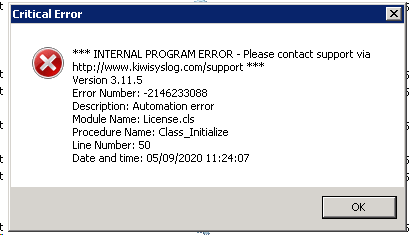
The Debug logs might also show the error below:
The Debug logs might also show the error below:
2020-09-29 14:35:46    1-Error 0       Kiwi CatTools Service  *** INTERNAL PROGRAM ERROR - Please contact support via http://www.kiwisyslog.com/support ***
2020-09-29 14:35:46    1-Error 0       Kiwi CatTools Service  Service Version 3.11.15 | Error Number: 3021 | Description: Either BOF or EOF is True, or the current record has been deleted. Requested operation requires a current record. | Module Name: DBCatCommon.bas | Procedure Name: CatDBActivityLoadDevice | Line Number: 120 | Date and time: 9/29/2020
Product section
Kiwi CatTools
Resolution
Edit the permission settings of the CatTools Manager file.
1. Go to C:\Program Files (x86)\CatTools3 and right click over to CatTools_Manager.exe and select Properties > Compatibility > Change Settings for All Users > Enable 'Run this program as Administrator' and hit Ok.
2. Restart Kiwi Cattools service and relaunch Kiwi Cattools, then have the customer run any activity to verify that they do not get any issues with permission to the Database.
If the steps above does not resolve the issue, reinstall Kiwi CatTools.
1. Create a backup copy of the CatTools folder
2. Download the Kiwi CatTools installer from the Customer Portal website.
3. Run the Kiwi CatTools installer as an administrator
If the Kiwi CatTools install does not continue after unpacking the files, reset the CatTools license
1. Deactivate the CatTools license using SolarWinds License Manager. This tool can be downloaded here .
- Launch SolarWinds License Manager as an administrator > choose Kiwi CatTools > click Deactivate
2. Run the SolarWInds License Reset Tool. Download here .
- Run the License Reset tool as an administrator.
- Password is 'burn/purify' without the single quotes.
3. Run the Kiwi CatTools installer again as an administrator.
4. After the reinstall, activate the CatTools license using License Manager.