
Applications Systems
Installation Pending on all agent plugins
Unable to schedule job on agent node xxxx - required APM plugin is missing or not installed properly. ewException caught: Error [0x57], [WorkerProcessManager::GetWpcByName - plugin [discovery] does not exist.]. Installation pending. Plug-in needs to be updated to a new version. Agent shows connected but not responding.
First published date
12/3/2021 8:03 PM
Last published date
3/10/2025 3:47 PM
Overview
Agents will typically have a variety of issues if the plugins fail to deploy or become stuck in a state of "pending installation." Symptoms may include:
►Unable to list resources
►Unable to poll applications
►Unable to poll cpu/memory or volume statistics
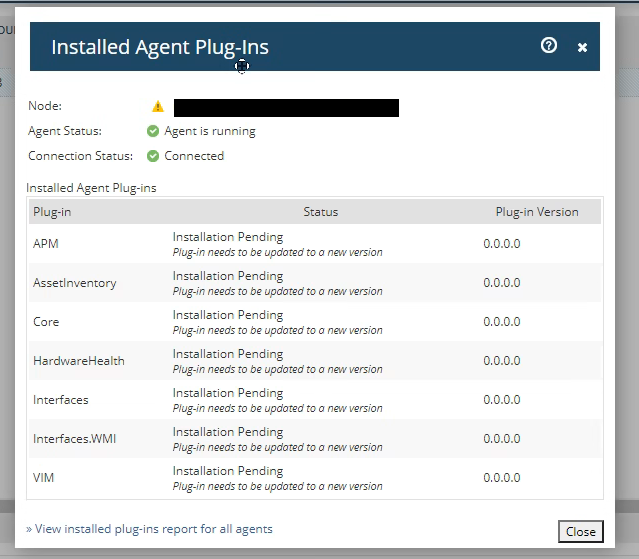
If you navigate to List Resources and are presented with this popup, you should move to the resolution section of this page.
Plugin report displays installation pending.
►Unable to list resources
►Unable to poll applications
►Unable to poll cpu/memory or volume statistics
If you navigate to List Resources and are presented with this popup, you should move to the resolution section of this page.
Plugin report displays installation pending.
Product section
Server Application Monitor
Cause
Failed deployment or file transfer of plugins.
Low disk space on installation drive / partition
Low disk space on installation drive / partition
Resolution
Check if enough disk space on the drive where agent is going to be installed and also on temp (tmp on linux) directory.
If only a single plugin has failed to deploy, attempt to redeploy the plugin if possible. This is done from the Settings > All Settings > Manage Agents page. Select agent > More Actions > View Installed Plugins. The retry plugin deployment option will only appear it the plugin installation comes back as failed.
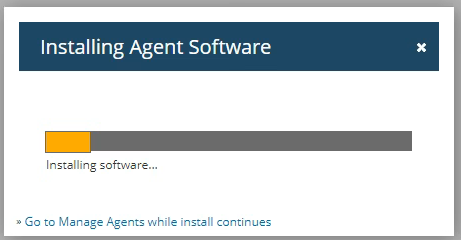
Sometimes the plugin is stuck in a state of installation pending. It should not be in this state for long durations before it's considered stuck and there will be two options. If only one plugin has failed to deploy, a reprovision on the agent should be attempted. If all or several of the plugins failed to deploy then a full reinstall of the agent should be required.
Note: certain plugins may not deploy unless the agent is assigned a task that requires it. e.g. if you assign a SAM application monitor to the agent, an APM plugin will need to be deployed which is responsible for the application polling jobs.
Remove from the web console if possible (change polling method to non-agent method, submit, check the box to uninstall agent software > change back to agent polling method)
Remove from the web console if possible (change polling method to non-agent method, submit, check the box to uninstall agent software > change back to agent polling method)
Contact SolarWinds Technical Support if the issue persists or unable to complete steps.
If only a single plugin has failed to deploy, attempt to redeploy the plugin if possible. This is done from the Settings > All Settings > Manage Agents page. Select agent > More Actions > View Installed Plugins. The retry plugin deployment option will only appear it the plugin installation comes back as failed.
Sometimes the plugin is stuck in a state of installation pending. It should not be in this state for long durations before it's considered stuck and there will be two options. If only one plugin has failed to deploy, a reprovision on the agent should be attempted. If all or several of the plugins failed to deploy then a full reinstall of the agent should be required.
Note: certain plugins may not deploy unless the agent is assigned a task that requires it. e.g. if you assign a SAM application monitor to the agent, an APM plugin will need to be deployed which is responsible for the application polling jobs.
Reinstall Orion Agent
WindowsRemove from the web console if possible (change polling method to non-agent method, submit, check the box to uninstall agent software > change back to agent polling method)
- Log into the agent server, start >Run > appwiz.cpl
- Find the SolarWinds agent software and uninstall
- Redeploy the agent via the web console (Settings > All Settings > Manage Agents > add agent )
Remove from the web console if possible (change polling method to non-agent method, submit, check the box to uninstall agent software > change back to agent polling method)
Contact SolarWinds Technical Support if the issue persists or unable to complete steps.