
Applications Systems
Increase timeout for 'No element was clicked' Message
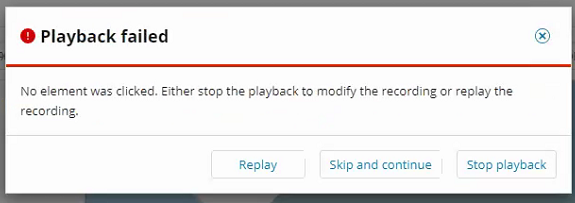
No element was clicked. Either stop the playback to modify the recording or replay the recording. Playback failed. Recording displays error even though it is navigating to the next page. OR! Recording times out (default:5sec) before element loads on the page. WPM yaml file. Player yaml, Recorder yaml. unknown error: cannot determine loading status {"code":-32000,"message":"Inspected target navigated or closed"}
First published date
6/2/2021 6:40 PM
Last published date
6/15/2021 5:21 PM
Overview
There is a misleading error message in WPM recorder that can cause the message "no element was clicked." This can occur when the
· Page takes longer than 10 seconds to navigate to the next page after clicking an element.
· Element does not load within 5 seconds. If the element is not found in that time, it will timeout.
This setting can be overridden on the recorder and the player.
· Page takes longer than 10 seconds to navigate to the next page after clicking an element.
· Element does not load within 5 seconds. If the element is not found in that time, it will timeout.
This setting can be overridden on the recorder and the player.
Product section
Web Performance Monitor
Cause
- Default timeout to get to next page = 10 seconds / Default timeout waiting on elements to load = 5 seconds
- Chromium v78 bug.
Resolution
First, ensure you're not receiving the following error in the worker logs. Because if the error is received then you will need to upgrade to WPM 2020.2.6.
Next ensure overriding this setting works in the recorder. Log into the recorder on the polling engine.
unknown error: cannot determine loading status
{"code":-32000,"message":"Inspected target navigated or closed"}
Which they traced to a known issue caused by the chromium driver version (v78) which is used in WPM 2020.2.4. That was resolved by chromium v80.Next ensure overriding this setting works in the recorder. Log into the recorder on the polling engine.
- Navigate to
C:\Program Files (x86)\SolarWinds\Orion\SEUM\Recorder\ChromiumProbe
- Create a text file: config.yaml
- Contents:
page_reload_timeout: 30
find_element_timeout: 30
Note: these values are given as an example, you may choose any timeout value. Units are in seconds. - Save the file and restart the WPM Recorder application - simulate your Recording and test for failure.
C:\Program Files (x86)\SolarWinds\Orion\SEUM\Player\ChromiumProbe