
Network Management
Increase 150 item limit on Subnet Tree and Scopes on Manage DHCP servers.
Change the Tree Max Items setting to increase the number of items that can be displayed in the Subnet tree on the manage Subnets & IP Addresses view in IPAM.
First published date
10/17/2018 9:15 PM
Last published date
6/12/2021 2:35 PM
Overview
- By default, the Subnet tree on the manage Subnets & IP Addresses view is limited to 150 items.
- You can increase this limit if you need to display more than 150 items.
Product section
IP Address Manager
Resolution
Login to your Orion Web Console.
-Click Setting
-Click All Setting.
-Look for Product Specific Settings.
-Click on IPAM Setting.
-Look for Settings.
-Click System Settings.
-Look for Visual Settings.
Change the Value for the following.
Tree Max Items.
Change the Value of the Tree Max Items.
Note: Default is 150.
We change it more than 1000.
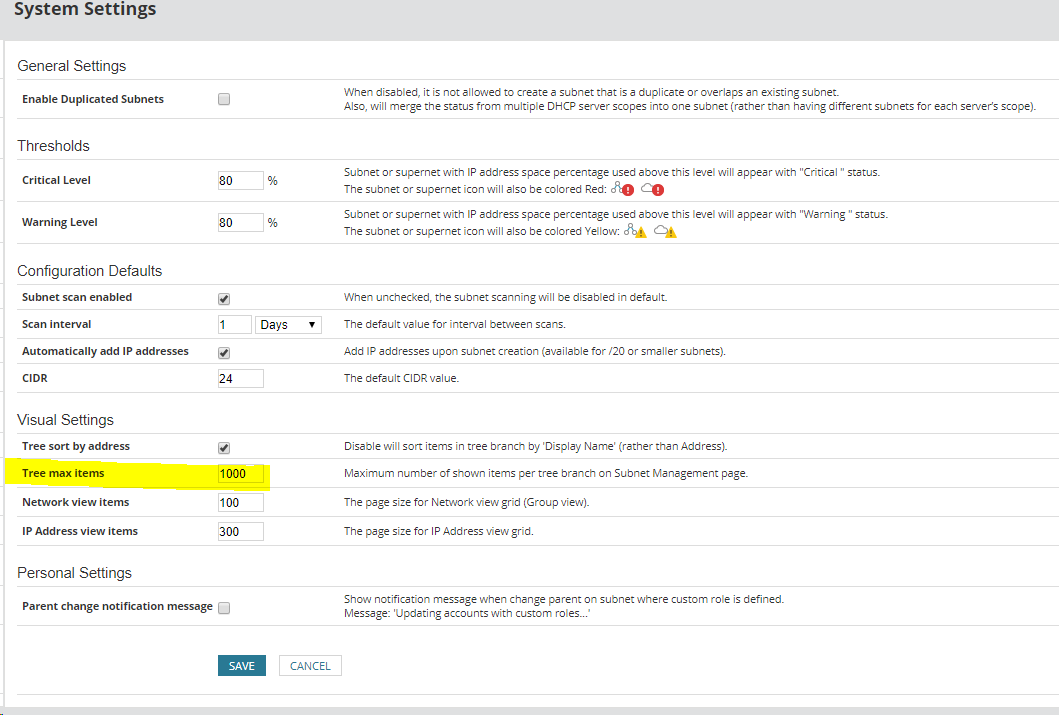
*Same process for Network view items and IP Address view items,
-Click Setting
-Click All Setting.
-Look for Product Specific Settings.
-Click on IPAM Setting.
-Look for Settings.
-Click System Settings.
-Look for Visual Settings.
Change the Value for the following.
Tree Max Items.
Change the Value of the Tree Max Items.
Note: Default is 150.
We change it more than 1000.
*Same process for Network view items and IP Address view items,