
Network Management
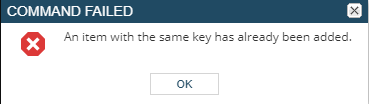
Importing an IPAM spreadsheet getting COMMAND FAILED An item with the same key has already been added
This article shows how to quickly resolve the issue in importing an IPAM spreadsheet getting COMMAND FAILED An item with the same key has already been added.
First published date
7/22/2020 6:20 PM
Last published date
7/22/2020 6:20 PM
Overview
The prompt below will show up if there will be any issue with importing the IPAM spreadsheet from an exported IPAM structure spreadsheet file.
Product section
IP Address Manager
Cause
- The sheet name on the Excel file is currently: Structure.xls
- The import is looking for the sheet name: Structure
Resolution
Resolution:
- Unzip the exported IPAMExport file (file will consist of a structure spreadsheet and a sub-directory of subnet spreadsheets)
- Open the Structure spreadsheet file
- On the lower left, you see the sheet name: Structure.xls
- Rename that to "Structure"
- Close and Save the file
- Then zip both the structure spreadsheet and a sub-directory of subnet spreadsheets
- Retry the Import IP addresses