
Tools
Import or export host list is grayed out in Dameware Mini Remote Control (MRC)
This article describes why the import or export host list is grayed out.
First published date
8/3/2021 12:27 AM
Last published date
8/3/2021 12:27 AM
Overview
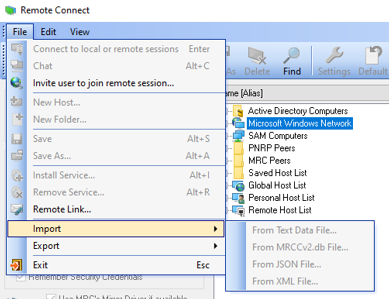
The Dameware MRC has an option to import or export host list for backup and restore purposes. However, in some cases, this option is grayed out.
Product section
Dameware Remote Support & Mini Remote Control
Cause
Saved or Personal Host list is not selected when exporting or importing.
Resolution
Option 1
1. In the MRC remote connect window, right-click Saved or Personal Host list.
2. Click Import or Export.
3. Select the appropriate file type.
Option 2
1. In the MRC remote connect window, click Saved or Personal Host list.
2. Click File menu, then select Import or Export menu.
3. Select the appropriate file type.