
Network Management
IPAM subnet scans fail to complete
Subnet scans are stuck and the status of IP addresses are not updated.
First published date
3/19/2020 9:50 PM
Last published date
11/13/2022 10:36 PM
Overview
Subnet scans are not being completed. On the page at Settings > All Settings > IPAM Settings > View Scan Job Status, there are lots of subnets showing status as queued. Editing subnet properties shows no polling engine is detected.
Product section
IP Address Manager
Cause
- No polling engine is assigned to subnets
- Stuck SDF files for Job Engine and Collector services
Resolution
1. You can edit the subnet then click Change Polling Engine and assign a polling engine.
2. You can also run a script in the database to move subnets to the correct Engine ID.
y = old engineid
3. If issue persists, clear the Job Engine and Collector SDF files.
Replace the Job Engine v2 SDF:
1. Stop all Orion services from Orion Service Manager.
2. Go to the C:\ProgramData\SolarWinds\JobEngineV2\Data\JobEngine35.sdf file and rename it to JobEngine35_OLD.sdf.
3. Create a copy of C:\ProgramData\SolarWinds\JobEngineV2\Data\JobEngine35 - Blank.sdf and rename it to JobEngine35.sdf. This way you have the old one to revert back to and you always have a blank copy in case an issue reoccurs.
4. Right-click the properties of the JobEngine35.sdfyou created and clear the read-only box. Click OK.
Replace the Collector (Polling Controller) SDF:
1. Stop all Orion services from Orion Service Manager.
2. Go to C:\ProgramData\SolarWinds\Collector\Data\PollingController.sdf file and rename it to PollingController_OLD.sdf
3. Then create a copy of C:\ProgramData\SolarWinds\Collector\Data\PollingController - Blank.sdf and rename it to PollingController.sdf.
4. This way you have the old one to revert back to and you always have a blank copy in case the issue reoccurs.
5. Right-click on the properties of the PollingController.sdf you have created and untick the read-only box and click ok.
6. Restart all Orion Services
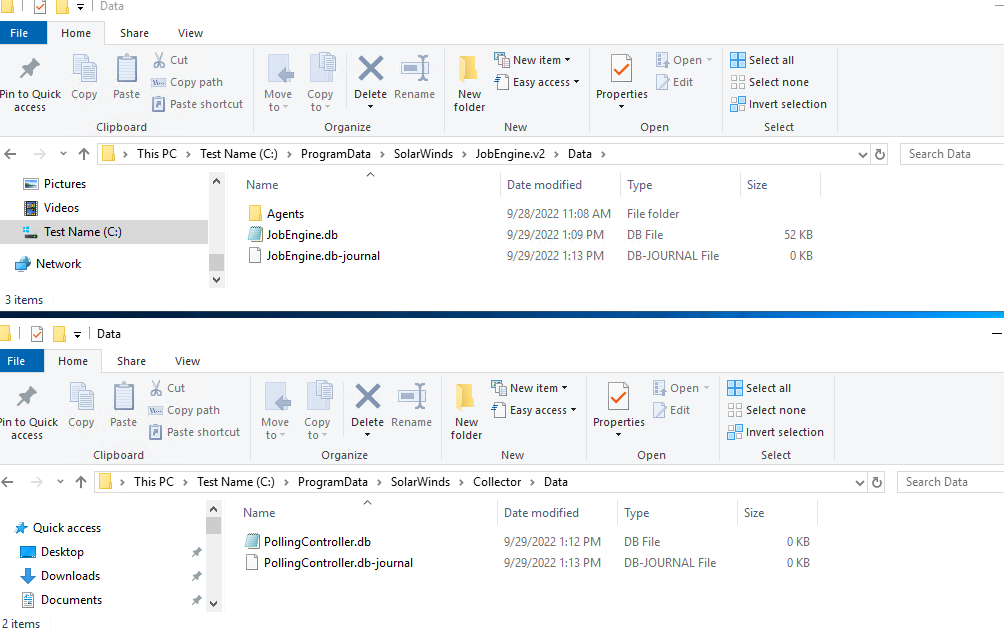
NOTE: As of 2022.x and above version, all the .sdf files were converted to .db(SQL Lite) files. If you need to “rebuild” JEv2 or Collector, they should be done at the same time if you’re going to do it, all that needs to be done is Stop the service(JEv2 and Collector), delete both the .db file and .db-journal file and then start the service. Upon service start, it will rebuild these files automatically fresh.
2. You can also run a script in the database to move subnets to the correct Engine ID.
-- Scripts are not supported under any SolarWinds support program or service.
-- Scripts are provided AS IS without warranty of any kind. SolarWinds further
-- disclaims all warranties including, without limitation, any implied warranties
-- of merchantability or of fitness for a particular purpose. The risk arising
-- out of the use or performance of the scripts and documentation stays with you.
-- In no event shall SolarWinds or anyone else involved in the creation,
-- production, or delivery of the scripts be liable for any damages whatsoever
-- (including, without limitation, damages for loss of business profits, business
-- interruption, loss of business information, or other pecuniary loss) arising
-- out of the use of or inability to use the scripts or documentation.

UPDATE IPAM_Group set engineid = 'x'
where grouptype = '8' and engineid = 'y'
x = new engineid
y = old engineid
3. If issue persists, clear the Job Engine and Collector SDF files.
Replace the Job Engine v2 SDF:
1. Stop all Orion services from Orion Service Manager.
2. Go to the C:\ProgramData\SolarWinds\JobEngineV2\Data\JobEngine35.sdf file and rename it to JobEngine35_OLD.sdf.
3. Create a copy of C:\ProgramData\SolarWinds\JobEngineV2\Data\JobEngine35 - Blank.sdf and rename it to JobEngine35.sdf. This way you have the old one to revert back to and you always have a blank copy in case an issue reoccurs.
4. Right-click the properties of the JobEngine35.sdfyou created and clear the read-only box. Click OK.
Replace the Collector (Polling Controller) SDF:
1. Stop all Orion services from Orion Service Manager.
2. Go to C:\ProgramData\SolarWinds\Collector\Data\PollingController.sdf file and rename it to PollingController_OLD.sdf
3. Then create a copy of C:\ProgramData\SolarWinds\Collector\Data\PollingController - Blank.sdf and rename it to PollingController.sdf.
4. This way you have the old one to revert back to and you always have a blank copy in case the issue reoccurs.
5. Right-click on the properties of the PollingController.sdf you have created and untick the read-only box and click ok.
6. Restart all Orion Services
NOTE: As of 2022.x and above version, all the .sdf files were converted to .db(SQL Lite) files. If you need to “rebuild” JEv2 or Collector, they should be done at the same time if you’re going to do it, all that needs to be done is Stop the service(JEv2 and Collector), delete both the .db file and .db-journal file and then start the service. Upon service start, it will rebuild these files automatically fresh.