
Network Management
IPAM Role does not update as expected in the Orion Platform
Users within an AD Group are not able to edit subnets and other IPAM data after updating the Role in the Web Console.
First published date
5/13/2020 3:27 AM
Last published date
8/17/2022 8:14 PM
Overview
Users that are part of a Windows AD group may find that the IPAM Role has not been updated as expected. The value can be changed on the page at Settings > All Settings > Manage Accounts > Edit Account:
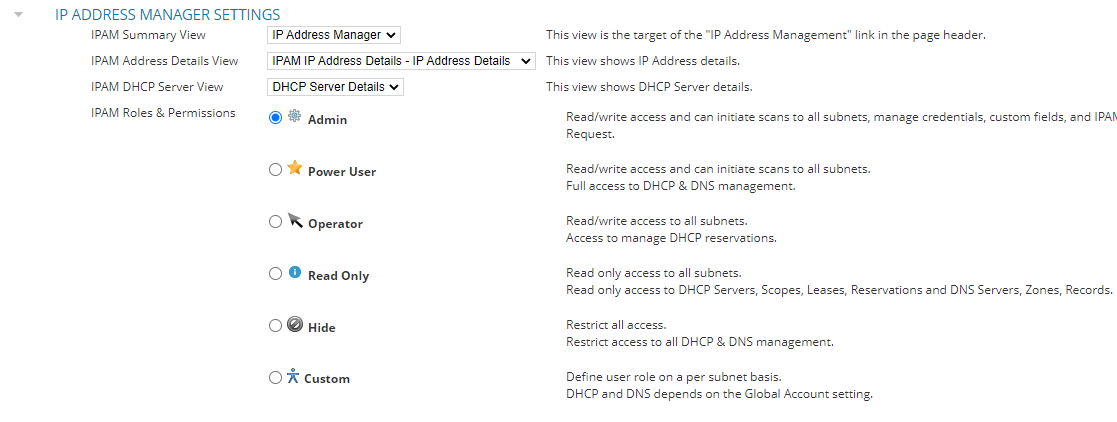
Changing the Role will update on the web console, but this change is not reflected on the WebUserSettings table.
Changing the Role will update on the web console, but this change is not reflected on the WebUserSettings table.
Product section
IP Address Manager
Cause
Previously defined custom roles for an AD user or an AD group are not updated in the database when the user role is changed.
Resolution
Note: Please ensure there is a current backup of the database before performing these steps.
This issue has been addressed in SolarWinds Platform 2023.1 and newer. Please consider upgrading your environment .
Update the IPAM AccountRole value directly on the database: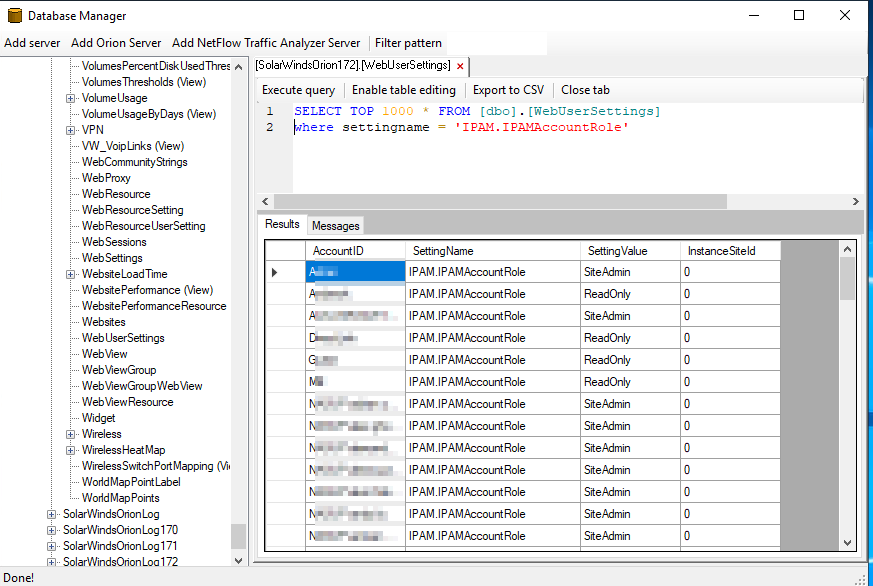
This issue has been addressed in SolarWinds Platform 2023.1 and newer. Please consider upgrading your environment .
Update the IPAM AccountRole value directly on the database:
- Connect to the Orion server.
- Open Database Manage in the SolarWinds Orion folder of the Start Menu.
- Select Add Orion Server and expand the SQL server and database in bold.
- Navigate to the WebUserSettings table and double-click.
- Execute the following query in the window on the right
-- Scripts are not supported under any SolarWinds support program or service.
-- Scripts are provided AS IS without warranty of any kind. SolarWinds further
-- disclaims all warranties including, without limitation, any implied warranties
-- of merchantability or of fitness for a particular purpose. The risk arising
-- out of the use or performance of the scripts and documentation stays with you.
-- In no event shall SolarWinds or anyone else involved in the creation,
-- production, or delivery of the scripts be liable for any damages whatsoever
-- (including, without limitation, damages for loss of business profits, business
-- interruption, loss of business information, or other pecuniary loss) arising
-- out of the use of or inability to use the scripts or documentation.

SELECT TOP 1000 * FROM [dbo].[WebUserSettings]
WHERE SettingName = 'IPAM.IPAMAccountRole'
- Identify the account(s) in question and confirm the SettingValue. This should be SiteAdmin, PowerUser, Operator, ReadOnly, or NoAccess.
- If there are unexpected values, select Enable Table Editing.
- Edit the SettingValue column with the expected role and press enter.
- Execute the query again to confirm the change was committed to the database.
- Test IPAM with the user account to confirm the proper role is assigned.