
Applications Systems
IIS Template test fails with an ASP error "failed with 'Unknown' status. HResult" in SAM
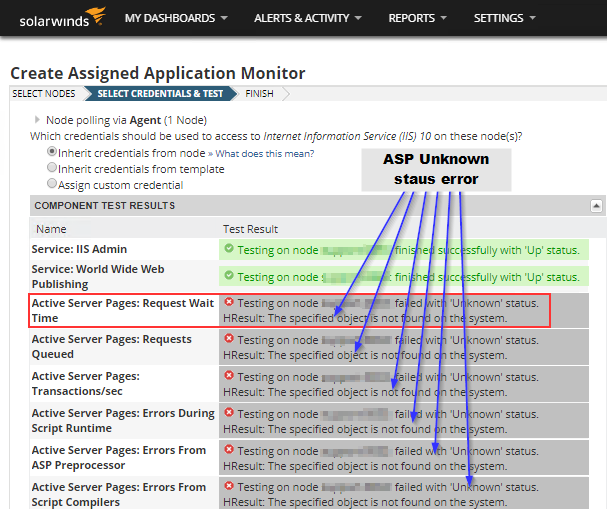
This article walks you through what is happening and how to resolve the issue when you get the error "failed with 'Unknown' status. HResult: The specified object is not found on the system" when Testing IISv6 or IISv10 Templates against a node running as a Web Server.
First published date
3/20/2020 8:45 PM
Last published date
3/20/2020 8:45 PM
Overview
When attempting to assign the IIS template, you select the node(') you want to assign it to and there is an option to test.
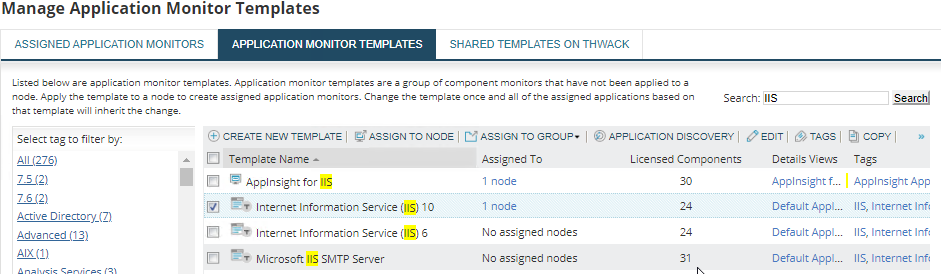
- Go to Settings > All Settings > SAM Settings > Manage Templates
- Find the IIS Template (6 or 10) depending on what version of IIS you are running on the Web Server
- Select the Template and Assign the node
- In the "Create Assigned Application Monitor" there is a button labeled "TEST"
- When clicking it you may get the following output
Product section
Server Application Monitor
Cause
"Need to enable ASP feature in IIS (10 or 6 ) to monitor ASP Components."
On a Windows Server 2016 Server or later
On a Windows Server 2016 Server or later
Resolution
Steps
Disclaimer: Please note, any content posted herein is provided as a suggestion or recommendation to you for your internal use. This is not part of the SolarWinds software or documentation that you purchased from SolarWinds, and the information set forth herein may come from third parties. Your organization should internally review and assess to what extent, if any, such custom scripts or recommendations will be incorporated into your environment. You elect to use third party content at your own risk, and you will be solely responsible for the incorporation of the same, if any.
- Open Server Manager
- Click on Start > Server Manager
- Add Roles and Features
- Click Manage > Add Roles and Features
- Installation Type
- "Roll-based or feature-based installation"
- Click Next
- Server Selection
- Choose the server and click next
- Server Roles
- Scroll down to "Web Server (IIS)" and expand
- Expand "Web Server"
- Expand "Application Development"
- Include
- Application Initialization
- ASP
- ASP.NET 3.5
- ASP.NET 4.6
- Expand Managment Tools
- Make sure the following are selected
- IIS Management Console
- IIS 6 Management Compatibility
- IIS Management Scripts and Tools
- Make sure the following are selected
- Click Next through Features then Install
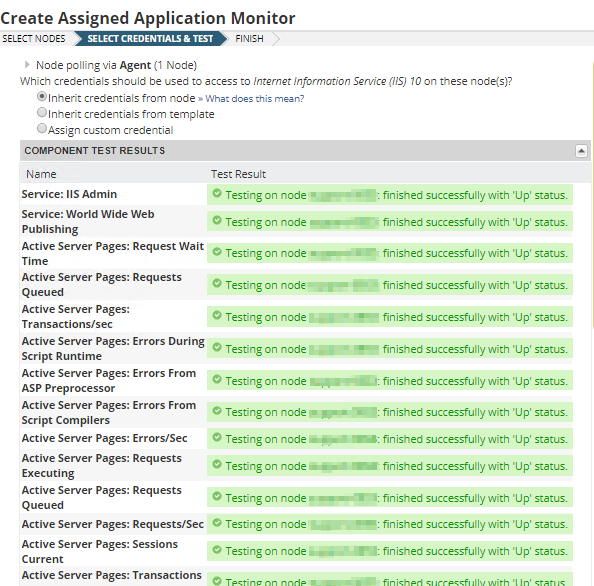
- You can now Finish assigning the Template
Disclaimer: Please note, any content posted herein is provided as a suggestion or recommendation to you for your internal use. This is not part of the SolarWinds software or documentation that you purchased from SolarWinds, and the information set forth herein may come from third parties. Your organization should internally review and assess to what extent, if any, such custom scripts or recommendations will be incorporated into your environment. You elect to use third party content at your own risk, and you will be solely responsible for the incorporation of the same, if any.